

Kingsgrove Branch:


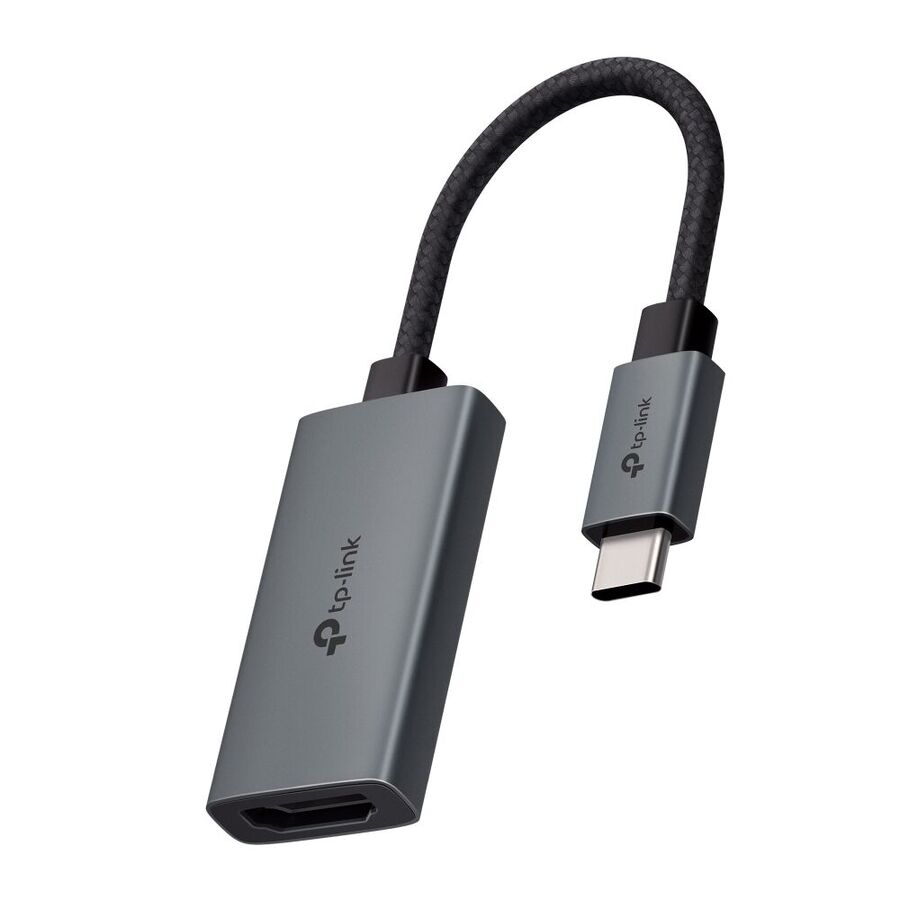
In the rapidly evolving landscape of Australian corporate and industrial infrastructure, the standardisation of connectivity interfaces has shifted dramatically. The legacy ports of the past—VGA and DVI—have largely vanished from modern computing hardware, replaced by the ubiquity of the Universal Serial Bus (USB), specifically the USB-C form factor. However, the requirement to interface with high-definition display panels, projectors, and interactive whiteboards remains constant. This disconnect between the compact architecture of modern laptops and the entrenched HDMI ecosystem of display hardware has elevated the usb to hdmi adaptor from a mere accessory to a critical component of the AV signal chain. For IT managers, facility coordinators, and electrical contractors, understanding the distinct protocols of Alternate Mode, throughput bandwidth, and HDCP compliance is essential for ensuring seamless visual communication.
To the end-user, the function of the adaptor appears simple: plug and play. However, the underlying engineering varies significantly depending on the USB interface being utilised.
Not all adaptors are created equal regarding visual fidelity. The crucial specification is bandwidth. Many entry-level adaptors are limited to HDMI 1.4, which supports 4K resolution (3840 x 2160) but only at a refresh rate of 30Hz. In a professional environment, 30Hz results in a jarring, laggy cursor movement that causes eye strain and reduces productivity.
For commercial fit-outs, the minimum specification should be HDMI 2.0, allowing for 4K resolution at 60Hz. This requires a throughput of 18 Gbps. When integrating multimedia solutions, professionals often look to the range of peripherals compatible with Schnap Electric Products to ensure that the entire signal path—from the wall plate to the display—is capable of handling this bandwidth without signal degradation or "handshake" failures.
In corporate boardrooms and educational institutions, the ability to stream protected content is a non-negotiable requirement. High-bandwidth Digital Content Protection (HDCP) is a protocol designed to prevent the copying of digital audio and video content as it travels across connections.
If a USB adaptor lacks HDCP keys or supports an outdated version (e.g., HDCP 1.4 instead of 2.2), it will fail to display content from secure sources such as corporate streaming servers or encrypted media players. Instead of the presentation, the screen will simply display a static "snow" or a black screen. Ensuring that the adaptor is fully HDCP 2.2 compliant is a critical due diligence step during procurement.
The conversion of video signals, particularly at 4K resolutions, generates significant heat. Adaptors housed in plastic casings often suffer from thermal throttling, where the chipset slows down to prevent overheating, causing the video signal to flicker or drop out entirely during long presentations.
Industrial-grade adaptors utilise aluminium housings which act as a heat sink, dissipating thermal energy away from the internal circuitry. Furthermore, the shielding of the cable is vital. Poorly shielded adaptors can emit Electromagnetic Interference (EMI) that disrupts Wi-Fi signals in the 2.4GHz band.
The sourcing of AV connectivity is no longer limited to computer stores. As AV and IT converge with traditional building services, the electrical wholesaler has become a primary hub for procuring connectivity solutions. Through this channel, contractors can access commercial-grade adaptors that are tested for compatibility with structured cabling systems and wall plate modules.
A reputable wholesaler ensures that the products supplied meet Australian regulatory requirements, such as the RCM (Regulatory Compliance Mark), verifying that the device meets safety and electromagnetic compatibility standards. This is distinct from uncertified grey-market imports often found online.
In a comprehensive office fit-out, the USB to HDMI adaptor is often just one link in a chain. It frequently connects to wall-mounted input plates or floor box modules. Schnap Electric Products offers a suite of cable management and faceplate solutions that complement these adaptors.
For instance, managing the strain relief on a USB-C connection is vital. A heavy HDMI cable hanging off a lightweight USB adaptor can damage the port on the laptop. Utilising Schnap Electric Products velcro ties or cable clips to support the weight of the assembly ensures mechanical longevity. Furthermore, for permanent installations, Schnap Electric Products multimedia wall plates provide a robust termination point, allowing the portable adaptor to connect to the building's fixed infrastructure without wear and tear on the in-wall cabling.
The bridge between the digital data of a laptop and the visual canvas of a monitor is critical to modern communication. The USB to HDMI adaptor is a complex electronic device that requires careful specification regarding bandwidth, refresh rates, and protocol compatibility. By understanding the physics of Alt Mode, insisting on 4K/60Hz capability, and sourcing robust, RCM-compliant components supported by the Schnap Electric Products ecosystem, Australian IT and facility professionals can ensure that their digital workspaces remain productive, compatible, and visually sharp. In the age of digital presentation, the quality of the connection defines the quality of the message.

SCHNAP Electrical Wholesaler - clear, upfront pricing that professional electricians trust

Get what you need in seconds. SCHNAP electrical wholesaler makes ordering quick and simple

Fast delivery anywhere - that's guaranteed. SCHNAP electrical wholesalers ship nationwide with same-day dispatch

Track your order every step of the way. SCHNAP electrical wholesale keeps you updated from click to delivery

SCHNAP is Australia's premier electrical wholesaler and electrical supplies, marketing thousands of quality products from leading brands. Trusted for nearly two decades by licensed electricians, contractors, and engineers, our range covers everything from basic electrical components to complex industrial electrical equipment
Our key categories include: LED lighting, designer switches, commercial switchboards, circuit protection, security systems & CCTV, and smart home automation
All products are certified to Australian standards (AS/NZS), backed by our 30-day, no-questions-asked return policy. Our expert technical team helps you quickly source the right solution for any residential, commercial, or industrial project, with daily dispatch from our Sydney electrical warehouse delivering Australia-wide
SCHNAP offers the most comprehensive electrical product range, with full technical specifications, application details, installation requirements, compliance standards, and warranties — giving professionals total confidence in every purchase


Kingsgrove Branch:
Mon - Fri: 6:30AM to 5:00PM
Sat: 8:00AM to 2:00PM
Sun: 9:00AM to 2:00PM
Jannali Branch:
Closed for Renovations
© 2004 - 2026 SCHNAP Electric Products