



Trade Discount 25%
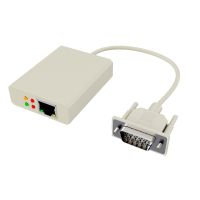
External SNMP Adaptor to Suit GP and Master Series UPS PSS
PSS external SNMP adaptor features network connection for remote UPS monitoring via IP address and email alerts. Ideal for GP and Master Series UPS.
Please sign in so that we can notify you about a reply

Sign in
Please login to continue to your account.
Alternatively Known As: PSS UPS SNMP Adapter, SW004 SNMP Serial Interface/LAN Module, UPS Network Management Adaptor
Technical Specifications
- Model: SW004
- Compatibility: PSS GP and Master Series UPS units
- Network Function: Remote UPS monitoring via IP address
- Alerting: Email event alerts, subject to IT network configuration
- Interface Type: External SNMP serial interface/LAN module
- Software: Supplied with Net-Agent Utility Software
- Packaging Unit: 1 each
- Dimensions (H x L x W): 30mm x 120mm x 80mm
- Weight: 0.25 kg
Key Features
- Connects compatible PSS UPS units to a local network
- Enables remote monitoring through an IP address
- Supports email alerts for UPS events
- Suitable for IT-managed environments and multiple UPS installations
- Supplied with Net-Agent Utility Software
- External design avoids requiring an internal UPS network card
Applications
- Remote monitoring of PSS GP Series UPS units
- Remote monitoring of PSS Master Series UPS units
- Network-managed UPS installations in server rooms and IT environments
- Centralised oversight of multiple compatible UPS systems
Environmental Benefits
- Remote monitoring can help identify UPS faults, battery conditions and operating issues earlier, supporting preventative maintenance and extending equipment service life
- Compact electronic accessory reduces the need for routine on-site status checks and associated travel
Warranty Information
PSS standard warranty is a 2-year return-to-base warranty from the original purchase date, subject to the manufacturer’s warranty terms and conditions. ([pssdistributors.com.au](https://www.pssdistributors.com.au/ups-warranty/?utm_source=openai))
Available Now
Available through PSS and authorised Australian distributors; confirm current stock and compatibility before ordering. ([pssdistributors.com.au](https://www.pssdistributors.com.au/product/snmp-for-gp800-ups/?utm_source=openai))