

Kingsgrove Branch:


Send us a photo and our team will help identify it.

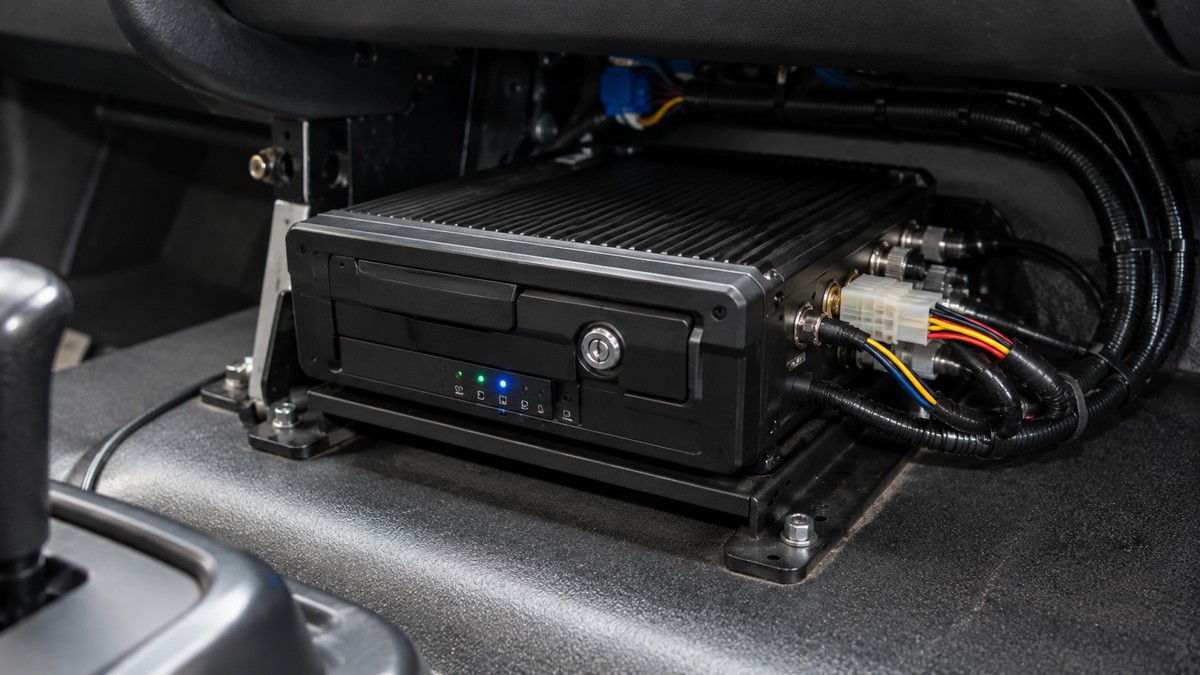
A courier company running six vans found out the hard way that a consumer dashcam doesn't hold up to fleet duty: footage from a low-speed reversing knock had already looped over by the time head office asked for it, three days after the ticket was raised. That's usually the moment a fleet manager starts looking at a proper mobile DVR or NVR instead of whatever the driver picked up themselves, and it raises the same first question every time: is this a choosing between NVR and DVR for a vehicle setup decision, or something else entirely.
A dashcam built for a private car is rated for occasional trips and short duty cycles. A work vehicle covering 200+ km a day on rough roads is a different environment entirely -- constant vibration, engine bay heat soaking into the cabin, and a power supply that cycles on and off every time the ignition turns over. Consumer units use a single SD card as both storage and write target, and SD cards fail early under that kind of repeated write-cycle stress, usually right when you need the footage most.
Mobile-rated DVR and NVR units are built around this environment from the start: shock-tolerant mounting, wider operating temperature ranges, and support for SSD storage rather than spinning HDDs, which matters a lot once vibration is a constant rather than an occasional bump.
A single delivery van watching front, rear, cabin and cargo area is a 4-channel job. A truck or bus with side-mirror cameras, a reversing feed, and cabin coverage for driver monitoring usually needs 8 channels, and it's worth speccing for that from the start rather than retrofitting later -- adding a channel after install means re-cabling, not just re-configuring.
| Vehicle Type | Typical Channels | Storage Note |
|---|---|---|
| Van / light commercial | 4-channel | Single SSD usually sufficient |
| Truck / bus | 8-channel | Dual HDD/SSD recommended for retention length |
In practice, an 8-channel unit with dual HDD/SSD support gives you a longer retention window before old footage overwrites -- typically weeks rather than days, depending on resolution and compression settings.
[!] Compliance note: in-vehicle recording that captures a driver or passengers can fall under workplace surveillance rules, and the requirements vary by state and by whether the footage is continuous or event-triggered. As a general rule, driver notification and a documented policy are worth getting sorted before fleet-wide rollout -- check current requirements with your HR or legal team rather than assuming installation alone covers it.
Sending someone to physically pull a drive from every vehicle in a fleet doesn't scale past a handful of vehicles. A mobile NVR with built-in GPS and WiFi offload lets footage sync automatically once the vehicle is back in range of a depot access point, and the GPS log ties footage to a location and timestamp -- useful for insurance claims where "where was the vehicle at the time" is the first question asked.
Wiring a recorder straight to a permanent 12V feed without a low-voltage cutoff is a common way to end up with a flat starter battery after a vehicle sits idle over a weekend. Most mobile DVR and NVR units support an ignition-linked or delayed-shutdown power input specifically for this -- it's worth confirming during install rather than after the first flat battery callout. If you're also running new 12V cable to power the unit itself, getting the gauge sizing right for the run length matters just as much as the cutoff wiring -- undersized cable on a long dash-to-boot run is its own failure point.
Related Reading
Fitting a consumer dashcam across the whole fleet. It looks cheaper on paper, but the failure rate under continuous vibration means higher replacement cost and gaps in footage right when it matters.
Choosing HDD storage for rough-road vehicles. Spinning drives don't cope well with sustained vibration -- SSD is the safer default for anything off smooth depot yards.
Under-speccing channel count. Adding a reversing camera or cabin feed later usually means re-cabling, not just a config change -- spec for the vehicle's full camera load from day one.
Skipping the low-voltage cutoff. A permanent 12V feed without one is how a fleet ends up with flat batteries after a weekend sitting idle.
Ignoring WiFi/GPS offload to save on the unit cost. The saving disappears fast once someone has to manually pull drives from every vehicle in the fleet each week.
how many channels do I need for a single van?
For most vans, 4 channels covers front, rear, cabin and cargo area. If you're only running one or two cameras today but expect to add more, it's usually cheaper to spec for that channel count now than upgrade the recorder later.
can a mobile DVR run off the vehicle battery without draining it flat?
Yes, as long as it's wired through an ignition-linked or low-voltage cutoff input rather than a permanent feed -- most mobile GPS/WiFi-enabled NVR units support this configuration natively.
ssd or hdd for a DVR that's going in a truck?
SSD, in practice, holds up better under sustained road vibration than a spinning HDD. Some units support dual HDD/SSD bays, which gives you the option of one drive of each for redundancy without committing fully to one or the other.
do I need to tell drivers they're being recorded in NSW?
Generally yes -- workplace surveillance rules typically require notice to employees before continuous recording starts, and the specifics depend on whether it's covert or overt, and on your state's legislation. Worth confirming current requirements with HR or legal before rollout rather than assuming installation alone is sufficient.
how do I pull footage off a mobile DVR without stopping the vehicle?
A unit with built-in WiFi offload will sync footage automatically once the vehicle comes within range of a depot access point -- no need to physically remove the drive or stop the vehicle mid-shift for a manual pull.
what's the difference between a mobile DVR and an NVR for a vehicle?
Broadly, DVR units process analog camera feeds and NVR units process IP/PoE camera feeds -- worth confirming which camera type you're already running or plan to install before locking in a unit.
For the full range of mobile DVR and NVR options -- and the rest of Schnap's NVR CCTV recorders range for fixed installs -- see the shop section below.
Trade pricing and same-day dispatch from Kingsgrove NSW on mobile DVR and NVR units built for fleet duty.
Browse the full vehicle DVR recorders range at Schnap -- trusted brands, dispatched same day from Kingsgrove NSW.

SCHNAP Electrical Wholesaler - clear, upfront pricing that professional electricians trust

Get what you need in seconds. SCHNAP electrical wholesaler makes ordering quick and simple

Fast delivery anywhere - that's guaranteed. SCHNAP electrical wholesalers ship nationwide with same-day dispatch

Track your order every step of the way. SCHNAP electrical wholesale keeps you updated from click to delivery

SCHNAP is Australia's premier electrical wholesaler and electrical supplies, marketing thousands of quality products from leading brands. Trusted for nearly two decades by licensed electricians, contractors, and engineers, our range covers everything from basic electrical components to complex industrial electrical equipment
Our key categories include: LED lighting, designer switches, commercial switchboards, circuit protection, security systems & CCTV, and smart home automation
All products are certified to Australian standards (AS/NZS), backed by our 30-day, no-questions-asked return policy. Our expert technical team helps you quickly source the right solution for any residential, commercial, or industrial project, with daily dispatch from our Sydney electrical warehouse delivering Australia-wide
SCHNAP offers the most comprehensive electrical product range, with full technical specifications, application details, installation requirements, compliance standards, and warranties — giving professionals total confidence in every purchase


Kingsgrove Branch:
Opening hours:
Mon - Fri: 6:30 AM to 5 PM
Saturday: 8:00 AM to 2:00 PM
Sunday: 9:00 AM to 2:00 PM
Closed on public holidays
Jannali Branch:
Closed for Renovations
© 2004 - 2026 SCHNAP Electric Products