

Kingsgrove Branch:


Send us a photo and our team will help identify it.

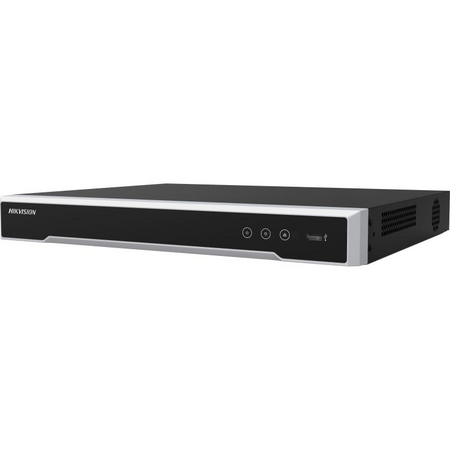
A client asks for eight cameras across a warehouse and office fit-out, the quote gets locked in on an 8-channel NVR, and six months later they want two more cameras over the loading dock. Now there's no channel left, no spare PoE port, and a return visit that could have been avoided at the quoting stage. Before locking in a channel count, it's worth picking NVR over DVR for the right reasons, because that decision changes how much headroom actually matters.
The channel count on the box is the ceiling, not the plan. Walking a site and counting entry points, internal corridors, stock areas and the odd spot the client mentions "eventually" is a different exercise to counting what's on the initial scope sheet. An 8-camera job that gets sized to an 8-channel NVR has zero room -- not for a camera that fails and gets swapped for a different model, not for a client request three months in, nothing. Sizing to the exact number on the quote treats that number as fixed, when in practice it rarely stays that way once the client sees the system running.
A more reliable approach is to count confirmed cameras first, then ask the client a direct question: are there any areas they've thought about covering but haven't committed to yet? That answer usually adds one or two cameras to the real number, even if it doesn't change what gets installed on day one.
It's a common assumption that an "8-channel NVR" means 8 cameras plug straight in and that's the end of the sizing conversation. In practice, channel count and PoE port count are two separate specs that happen to match on a lot of models -- but not all of them. Some NVRs are sold with fewer built-in PoE ports than channels, on the assumption that extra cameras will be powered through a separate PoE switch or existing network infrastructure. If a job is being priced on the NVR's ports alone, it's worth checking the actual port count against the channel count on the datasheet before quoting, rather than assuming they line up.
[!] PoE Budget Note: Even when the port count matches the channel count, total PoE wattage across all ports is typically capped at a combined budget, not per-port maximum. Higher-draw cameras (PTZ units, cameras with heaters, or long-range IR) can, in practice, eat into that shared budget faster than a straightforward count of ports would suggest -- it's worth checking the NVR's total PoE budget against camera power draw on larger jobs, rather than assuming every port can run at full load simultaneously.
Sizing to exactly what's on the quote is the single biggest reason installers end up doing a return visit for a system upgrade instead of a simple camera add. A 12-camera site sized to a 12-channel NVR has no path forward -- the next camera means a new recorder, a data migration, and a client asking why the original system couldn't handle "just one more camera." Sizing one tier up from the confirmed count is generally the more defensible call, even if it costs slightly more at quoting stage, because it turns a future system replacement into a five-minute cable-in.
This matters more on commercial jobs than residential ones. A homeowner with six cameras rarely adds more. A warehouse, retail fit-out, or multi-tenant commercial site is a different story -- cameras tend to get added as the business grows, as incidents happen, or as insurance requirements change. Sizing commercial jobs with headroom in mind from the start avoids the awkward conversation where the client assumes "adding a camera" is a small job and finds out it's actually a full recorder swap.
Related Reading
As a general starting point, the table below maps typical job types to a channel count, based on confirmed camera count plus reasonable headroom -- not a hard rule, but a useful sense check against what's being quoted.
| Typical Job | Confirmed Cameras | Suggested NVR Size |
|---|---|---|
| Small shop or office | 2-4 | 4-channel |
| Warehouse or mid-size retail | 6-10 | 8 to 16-channel |
| Multi-building or larger commercial site | 14-24 | 32-channel |
| Large facility, campus, or multi-tenant complex | 40-60+ | 64 to 128-channel |
For genuinely large-scale deployments -- multi-site enterprise, large campus, or centralised monitoring across several buildings -- 256-channel recorders exist for exactly that scenario, though a job that size is generally the exception rather than the norm on most installer schedules.
Quoting to the exact camera count with zero spare channels. This is the mistake behind almost every "can we just add one more camera" callback -- there's no slack built in, so any change means a new recorder.
Assuming PoE ports always match channel count. As covered above, some models separate the two -- checking the datasheet avoids a job where the recorder arrives short on ports.
Ignoring total PoE wattage budget on larger camera counts. A recorder with enough ports can still run short on power if several high-draw cameras (PTZ, heated housings) are on the same system.
Sizing storage as an afterthought. Channel count decides how many cameras can connect, but drive capacity decides how long footage is actually retained -- a correctly sized channel count with an undersized drive still leaves the client with gaps in their recording history.
Not asking about future stages. Client mentions a warehouse expansion or a second building coming online in a year, and the recorder gets sized to the current stage only -- a five-minute conversation at quoting stage avoids this.
Treating small residential and commercial jobs the same way. A 4-channel recorder that's right for a small shop is the wrong call for a warehouse that's likely to grow -- job type matters as much as current camera count.
can I use a 16-channel NVR with only 8 cameras right now?
Yes -- an NVR doesn't need every channel populated to work correctly. Running 8 cameras on a 16-channel unit simply leaves 8 channels free for later, which is generally a reasonable way to build in headroom on a job expected to grow.
how many channels do I need for a 12-camera site?
Based on the confirmed count alone, a 16-channel unit covers it with a small buffer. If the client has mentioned any expansion plans, a 16-channel NVR with 16 PoE ports gives room to grow without a recorder swap down the track.
do I need to be a registered cabler to run PoE cabling for a CCTV system in NSW?
Structured cabling work connecting to a network -- including PoE runs for CCTV -- typically falls under cabling registration requirements administered through the ACMA framework, and licensing rules can vary depending on the specific scope of work. It's worth confirming current registration requirements for the job at hand before starting cabling work, rather than assuming it falls outside scope.
why does my 8-port NVR only power 4 cameras properly?
This usually comes back to the total PoE wattage budget being shared across all ports rather than allocated per port -- if the connected cameras draw more combined power than the unit supports, some ports may underperform even though they're technically active. Checking the datasheet's total PoE budget against actual camera draw before commissioning avoids this. For jobs with several higher-draw cameras, an 8-channel NVR with a higher PoE port budget is worth checking against the load.
how much hard drive space do I need for 8 cameras recording continuously?
This depends heavily on resolution, frame rate, and compression, so there's no single figure that applies to every job -- as a general rule, higher-resolution cameras recording continuously (rather than motion-triggered) will fill storage noticeably faster than a lower-resolution, motion-triggered setup. Checking the manufacturer's storage calculator against the specific camera models on the job is more reliable than estimating.
can I add more cameras to my NVR later without swapping it out?
Only if there's spare channel capacity and PoE headroom already built in -- this is the core reason for sizing above the exact confirmed camera count in the first place. On jobs likely to grow, a 32-channel NVR leaves considerably more room than sizing tight to the current count.
For the full range of NVR CCTV recorders in other channel counts and configurations, see the shop section below.
Trade pricing and same-day dispatch from Kingsgrove NSW across the full NVR range, from small-site 4-channel units through to enterprise-scale 256-channel recorders.
See the full NVR channel count range at Schnap and get same-day dispatch from Kingsgrove NSW.

SCHNAP Electrical Wholesaler - clear, upfront pricing that professional electricians trust

Get what you need in seconds. SCHNAP electrical wholesaler makes ordering quick and simple

Fast delivery anywhere - that's guaranteed. SCHNAP electrical wholesalers ship nationwide with same-day dispatch

Track your order every step of the way. SCHNAP electrical wholesale keeps you updated from click to delivery

SCHNAP is Australia's premier electrical wholesaler and electrical supplies, marketing thousands of quality products from leading brands. Trusted for nearly two decades by licensed electricians, contractors, and engineers, our range covers everything from basic electrical components to complex industrial electrical equipment
Our key categories include: LED lighting, designer switches, commercial switchboards, circuit protection, security systems & CCTV, and smart home automation
All products are certified to Australian standards (AS/NZS), backed by our 30-day, no-questions-asked return policy. Our expert technical team helps you quickly source the right solution for any residential, commercial, or industrial project, with daily dispatch from our Sydney electrical warehouse delivering Australia-wide
SCHNAP offers the most comprehensive electrical product range, with full technical specifications, application details, installation requirements, compliance standards, and warranties — giving professionals total confidence in every purchase


Kingsgrove Branch:
Opening hours:
Mon - Fri: 6:30 AM to 5 PM
Saturday: 8:00 AM to 2:00 PM
Sunday: 9:00 AM to 2:00 PM
Closed on public holidays
Jannali Branch:
Closed for Renovations
© 2004 - 2026 SCHNAP Electric Products