

Kingsgrove Branch:


Product help, identification or bulk pricing.
Send us a photo and our team will help identify it.
Large quantities? Send us the details via WhatsApp.
Enter a quantity or some details about your bulk request.
Request via WhatsApp
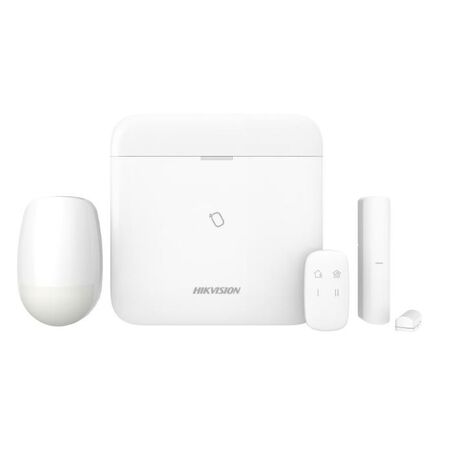
A landlord in Rosebery signed off on a new tenancy fit-out last month with one condition: get an alarm in before the new tenant moves in, and don't touch the plaster. No existing cable runs, no time for a cable puller, and a client who wanted it monitored from day one. That's exactly the job a Hikvision AX Pro wireless kit is built for. Before locking in a hub size for a job like this, it's worth having how many zones you actually need sorted, since that number drives every other decision in the kit.
Wireless isn't always the better option — on a new build with the walls open, running cable is still cheaper per point and gives you a more predictable system. Where wireless earns its keep is exactly the scenario above: occupied premises, finished walls, a tenant changeover window measured in days, or a client who simply doesn't want cable chased through a heritage-listed hallway. In that context, an AX Pro hub with a handful of wireless PIRs and a keypad can go from unopened box to armed system in an afternoon, without a single hole cut for cable.
The trade-off is planning discipline. With hardwired zones you can always add a cable run if the client asks for one more sensor down the track. With a wireless hub, you're working inside a fixed device capacity from day one, so the sizing decisions below matter more than they would on a wired job.
Both AX Pro hubs sit in Schnap's alarm panels and kits range, and the choice usually comes down to what the site already has and what the client wants down the line. The standard TCP/IP Wi-Fi hub connects over the client's existing network — the practical default when there's a router already on site and no plan to add CCTV integration.
| Hub | Best fit |
|---|---|
| AX Pro Hub — TCP/IP Wi-Fi Encryption | Straightforward retrofit, existing network on site, no CCTV tie-in planned |
| AX Pro Hub — Tri-X Cam-X Protocol | Client wants camera-verified alarms, or a CCTV upgrade is likely within the next year or two |
If there's any chance the client asks for camera verification later — insurers are increasingly nudging commercial clients toward it — the Tri-X Cam-X hub is worth the small premium now rather than a hub swap in twelve months.
For a small home or office retrofit, the temptation is to buy exactly enough PIRs to cover the rooms the client mentioned in the first phone call. In practice, it pays to walk the site the same way you would for a wired zone count — count entry points, not just rooms, and leave at least one spare device slot on the hub for whatever the client remembers to ask for once the quote's already signed.
Fob allocation follows the same logic as door codes on a keypad system — decide upfront how many keyholders the client actually has (not how many they think they might hire), and confirm that number against what the hub supports before you're back on site a second time because someone's new cleaner needs access.
This is the decision that's most expensive to get wrong after the fact. The Hybrid Pro LCD keypad with card reader supports one-touch arming and up to 64 fobs, which suits a small office where staff turnover means codes get shared around more than anyone would like. A standalone wireless keypad without the reader is a cheaper unit, but adding card access later usually means a second keypad rather than a simple swap — so it's worth asking the client at quote stage whether card access is likely, not just whether they want it now.
On a tenancy job specifically, card access is often the deciding factor: a new tenant moving into a commercial space is far more likely to want staff cards than a homeowner is, so the calculus shifts even for what's otherwise an identical wireless kit.
Sizing PIRs like a wired zone count. Wired systems make it relatively cheap to add a zone later. Wireless hubs have a fixed device ceiling, so under-buying PIR count on the assumption you'll "just add one later" often means a hub swap instead of a five-minute add-on.
Skipping the walk-test. Mounting the hub in a cupboard or under the stairs because it's tidy, then finding a bedroom PIR drops out intermittently once furniture and finished walls are in place. Test range with the hub in its final position before final PIR placement, not after.
Assuming the client's Wi-Fi is reliable enough for monitoring. A TCP/IP hub is only as dependable as the router it's plugged into. On a tenancy where the landlord controls the internet plan, confirm uptime expectations before committing to a Wi-Fi-only setup.
Deciding on keypad type without asking about future card access. Retrofitting a card reader after a wireless-only keypad is already mounted and commissioned is a second site visit and, on some jobs, a second unit rather than an upgrade.
Not confirming CMS or monitoring compatibility before ordering. Some monitoring providers have preferences around hub firmware or two-way keypad models. A quick check before the order goes in avoids a returns conversation later.
What's the realistic wireless range for an AX Pro PIR sensor?
In practice, expect the manufacturer's quoted open-air range to drop noticeably once internal walls, metal framing or appliances sit between the PIR and the hub — as a general rule, budget for meaningfully less than spec-sheet distance and confirm with a walk-test on site.
Is there a pre-bundled starter kit for a straightforward small retrofit?
Yes — the AX Pro wireless alarm kit with PIR and key fob included covers the common single-hub, single-PIR starting point, which is a fast way to quote a straightforward home or small office job before adding extra devices as needed.
What's actually different between the standard hub and the Tri-X Cam-X version?
The Tri-X Cam-X hub supports camera-verified alarm protocols, which the standard TCP/IP Wi-Fi hub doesn't — worth choosing upfront if camera integration is likely, since swapping hubs later means re-pairing every device.
Can I fit a basic wireless keypad instead of the card-reader version?
Yes — the wireless LCD keypad without card reader is a lower-cost option where the client only needs code-based arming and card access isn't on the table.
Do I need a security licence to install a wireless alarm system in NSW?
Installing and servicing monitored alarm systems in NSW typically requires the installer to hold a security licence under the relevant state licensing scheme — confirm current licence class requirements with NSW Fair Trading before quoting monitored work if you're not already licensed for it.
Do I need to think about door power separately if I'm also fitting access control on the same job?
Yes — an AX Pro alarm kit doesn't power door hardware, so if the same job includes electric strikes or maglocks, that's a separate power budget. See our guide on sizing access control power by door count for working that out alongside the alarm scope.
For the full range of Hikvision AX Pro and related wireless components, see the shop section below.
Trade pricing on the full AX Pro range, with same-day dispatch from Kingsgrove NSW on stocked items.
See the full Hikvision AX Pro range at Schnap and get same-day dispatch from Kingsgrove NSW.
Related Reading

SCHNAP Electrical Wholesaler - clear, upfront pricing that professional electricians trust

Get what you need in seconds. SCHNAP electrical wholesaler makes ordering quick and simple

Fast delivery anywhere - that's guaranteed. SCHNAP electrical wholesalers ship nationwide with same-day dispatch

Track your order every step of the way. SCHNAP electrical wholesale keeps you updated from click to delivery

SCHNAP is Australia's premier electrical wholesaler and electrical supplies, marketing thousands of quality products from leading brands. Trusted for nearly two decades by licensed electricians, contractors, and engineers, our range covers everything from basic electrical components to complex industrial electrical equipment
Our key categories include: LED lighting, designer switches, commercial switchboards, circuit protection, security systems & CCTV, and smart home automation
All products are certified to Australian standards (AS/NZS), backed by our 30-day, no-questions-asked return policy. Our expert technical team helps you quickly source the right solution for any residential, commercial, or industrial project, with daily dispatch from our Sydney electrical warehouse delivering Australia-wide
SCHNAP offers the most comprehensive electrical product range, with full technical specifications, application details, installation requirements, compliance standards, and warranties — giving professionals total confidence in every purchase


Kingsgrove Branch:
Opening hours:
Mon - Fri: 6:30 AM to 5 PM
Saturday: 8:00 AM to 2:00 PM
Sunday: 9:00 AM to 2:00 PM
Closed on public holidays
Jannali Branch:
Closed for Renovations
© 2004 - 2026 SCHNAP Electric Products