
Kingsgrove Branch:

Skooby
Electrical Assistant

G'day! I'm Skooby. Ask me about wiring rules or search our product catalog.
SCHNAP Trade Support
Product help, identification or bulk pricing.
Opens WhatsApp Trade Support
Not sure what this product is?
Send us a photo and our team will help identify it.
Send us any one of these:
Send Us a Photo on WhatsApp
- A clear photo of the full product
- Product label or brand
- Model/part number, if visible
- Product packaging, if available
Request Bulk Quote
Large quantities? Send us the details via WhatsApp.
Enter a quantity or some details about your bulk request.
Request via WhatsApp
- Menu
-
-
Cable
- Power Cables
- Specialty Cable
- Data & Comms Cable
- Fibre Optic Cable
- Solar Cable
-
Cable Accessories
- Aluminium Lugs
- Copper Lugs
- Bi-Metal Lugs
- Circuit Breaker Lugs
- Bootlace Pins & Terminals
- Bullet Terminals
- Forked Terminals
- Insulated Bell Terminals
- Insulated Pins
- Lug Terminals
- Non Insulated Tabs
- Piggy Back Terminals
- Quick Disconnects
- Stud Rings
- Terminal Lip Blades
- C Connectors
- Crimp Links
- Waterproof Crimp Links
- In-Line Splices
- Cable Joiners
- View more →
- Cable Support
-
Conduit & Ducts
- Heavy Duty Conduit
- Medium Duty Conduit
- Communications Conduit
- NBN Conduit
- Solar Conduit
- Corrugated Conduit
- Anaconda Pipe & Adaptors
- Rubber / Flex Conduit
- Split Conduit / Loom Tube
- Conduit Fittings
- Cable Duct
- Skirting Duct & Accessories
- Cable Covers
- Cable Pulling Accessories
- Pits, Pillars & Underground Enclosures
- Hazardous Area Ex Fittings
- Cabinets & Network Equipment
- Copper Cabling Components
- Fibre Optic
- Voice & NBN
- Data & Comms Tools
-
Electrical
- Powerpoints
- Switches & Mechs
- Plugs, Sockets & Adaptors
- Cover Plates & Grid Plates
- Mounting Accessories
- MATV & TV
- Sensors, Bells & Chimes
- Lighting Parts
- Appliance Parts
-
Switchboards & Meter Boxes
- Flush Mounted Switchboards
- Surface Mounted Switchboards
- Temporary Switchboards
- Temporary Switchboard Accesssories
- Distribution Boards
- Meter Boxes
- Plastic Enclosures
- Metal Enclosures
- Circuit Breaker Enclosures
- NBN Enclosures
- IP Rated Enclosures
- Adaptable Boxes & Accessories
- Pushbutton Enclosures
- Junction Boxes
- Extension Boxes
- Enclosure Accessories
-
Switch Gear & Protection
- AC Circuit Breakers
- DC Circuit Breakers
- Plug-In Circuit Breakers
- Moulded Case Circuit Breakers (MCCB)
- MCCB Accessories
- Residual Current Devices (RCDs)
- MCB / RCD / RCBO Combos
- Surge Protection
- Arc Fault Detection
- Main Switches
- Change Over Switches
- Isolators
- Contactors & Equipment
- Contactor Accessories
- Relays
- Overload Relays
- Relay Bases
- Thermal Overloads
- Electronic Overloads
- Fuses & Fuse Holders
- View more →
- Timers
- Metering
- Switchboard Accessories
- Earthing
- Kitchen & Household Appliances
- Battery & Device Chargers
-
Lighting
- Indoor Lighting
- Outdoor & Landscape
- Commercial & Industrial
- Lamps & Globes
- Ceiling Fan Lights & Fittings
- Lighting Accessories
- Exit & Emergency
- Air Conditioning
- Ceiling Fans
- Exhaust Fans
- Heaters & Hand Dryers
- Pedestal & Wall Fans
- Louvres & Grillers
- Ducting
-
HVAC & Ducted Components
- Pair Coil
- Colorbond Trunking
- Drip Trays & Drain Pipe
- Condensate Pumps
- Dektites
- Duct Supporting Straps
- Mounts & Brackets
- Quick Connect Fittings
- AC Cable
- Tape & Accessories
- AC Support Hardware
- Anti-Vibration & Seismic Mounts
- Copper Braze Fittings
- Flare & SAE Fittings
- Refrigerant Hoses & Line Sets
- Refrigeration Valves
- Ducted Vacuum Systems
- Filter Driers & Sight Glasses
- Oil Separators & Receivers
- Ducted Fittings
- Zone & System Controls
- HVAC Tools
- Worklights & Task Lighting
-
Solar & Smart
- Solar Panels
- Inverters
- Battery Storage
- EV Chargers & Accessories
- Solar Racking
- Solar BOS & Accessories
- Network Protection Boards
- Off-Grid Systems
- Portable Power Solutions
- Solar Tools
-
Automation
- C-Bus Controllers
- C-Bus Dimmer Controllers
- C-Bus Keypads
- C-Bus Mechs
- C-Bus Sensors
- C-Bus Output Boards
- C-Bus Input Boards
- C-Bus Built Boards
- C-Bus Network Interface & Bridges
- C-Bus PC Interface & Dongles
- C-Bus Power Supply
- C-Bus Bus Couplers
- C-Bus Gateways
- C-Bus Relays
- C-Bus Wall Box & Plates
- Clipsal Wiser
- Other BUS Automation
- Smart Switches & Outlets
- Smart Lighting
- WiFi & Wireless
- Security & Surveillance
- Access Control
- Intercoms
- Alarms & Detection
- Home Entertainment
- E-Mobility
-
Industrial
-
Tools
- Hand Tools
-
Power Tool Accessories
- Drill Bit Sets
- Drill Bit - Metal & Wood
- Drill Bit - Masonry
- Drill Bit - Glass & Tile
- Drill Bit - Ceramic
- Drill Bit - Long Series
- Multi Purpose Drill Bits
- Hole Saws & Kits
- Hole Saw Blades & Accessories
- Spade Bits & Kits
- Step Drills
- Auger Bits
- Driver / Adapter Bits
- Hexagonal Driver Bits
- Extension Bars
- Cut Off Discs
- Flap Discs
- Grinding Discs
- Blades
- Hacksaw Blades
- View more →
-
Meters & Testers
- Multimeters
- Clamp Meters
- Insulation Testers
- RCD Testers
- Loop Impedance Testers
- Multifunction Testers
- Voltage Testers
- Phase Rotation Testers
- Pair Testers
- Appliance Testers
- Lux Meters
- Circuit Tracers
- Butt Phones & Accessories
- Meter Load Testers
- Earthing Leads
- Test Equipment Accessories
- Earth Resistance Testers
- Micro-Ohm & Low Resistance Testers
- Specialty Test Instruments
- Heat & Soldering
- Work & Safety Lights
- Tool Storage
- Tool Kits
-
Fixings & Hardware
- Wood Screws
- Metal Screws
- Masonry / Brick Screws
- Bakerlite Screws
- Assorted Screw Packs
- Nuts and Bolts
- Nylon Nuts & Bolts
- Washers
- Rivets
- Toggles
- Wall Fixings
- Wall Mates / Plaster Mates
- Drop In Anchors
- Dyna Bolts / Sleeve Anchors
- Eye Bolts
- Nylon Nail In Anchors
- Screw Bolts
- Wall Plugs
- Chain
- D Shackles
- View more →
-
Consumables
- Electrical Insulation Tape
- Self Amalgamating Tape
- Construction Tape
- Double Sided Tape
- Duct Tape
- Warning Tape
- Adhesives & Glue
- Silicone & Foam
- Paint & Zinc Spray
- Corrosion Inhibitors
- Fire Seal
- Pens, Pencils & Markers
- Crayons
- Compliance Certificates
- Appliance Test Log Books
- Emergency Testing Log Books
- Batteries
- Vacuum Accessories
- Thinners & Solvents
- Painting Accessories
- View more →
- PPE & Personal Protection
- Site Safety & Emergency
- Ladders & Access Equipment
- Cleaning & Janitorial
- General & Site Equipment
- Power Tools
- Outdoor Power Equipment
- Plumbing
- Brands
- Blog
-
Cable
KNX Switch: Choosing the Wall-Side Control for the Job
01/10/2026
by Denny Setiawan
The drawings for a twelve-room boutique hotel fit-out show "KNX switch" at every entry door and bedhead, and nothing else. On a KNX job that label can point to two very different pieces of hardware, and only one of them goes on the wall. Below is how to tell which one the drawing means, and how to pick between a touch panel, a programmable control unit and a dry-contact interface once you know.
What "KNX Switch" Means on a Drawing
In KNX, the wall control and the device that switches the load are separate. The push-button or touch panel on the wall only sends a command onto the bus. The actual switching happens in a DIN-rail actuator back in the board, and some designers and suppliers call that actuator a "KNX switch" too.
If the symbol sits at a door or bedhead on the floor plan, it means the wall side. If it shows up on the board schedule, it means the output side, and that choice comes down to channel count and ballast load, covered in our breakdown of matching the KNX lighting controller to the job.
The wall side runs on the extra-low-voltage KNX bus (nominally 30V DC), so a KNX push-button doesn't carry the lighting current at all. That changes how you choose it. You're picking button count, status feedback, finish and how it gets programmed, not a current rating.
Related Reading
The Four Wall-Side Options Compared
Schnap lists these under Other BUS Automation, next to the controllers and actuators they talk to. All four are Legrand, but each one solves a different problem at the wall.
| Option | What the listing confirms | Where it fits |
|---|---|---|
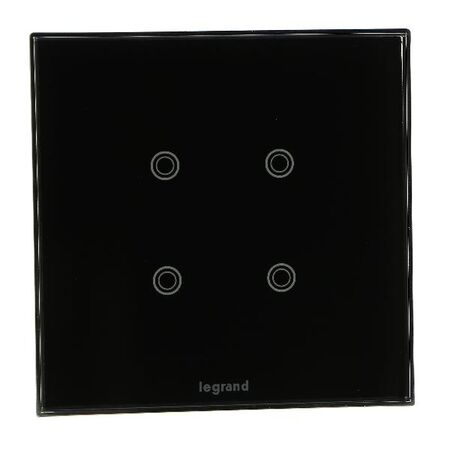
| Touch control panel | 4 touch-sensitive buttons, black glass plate supplied, wall mount | Entry doors, one main control point per room |
| Touch control mechanism | 6 capacitive touch buttons, white glass plate, flush mount | Positions running more than four functions |
| Control unit, programmable RGB | 4 buttons / 4 action points, RGB LEDs (12 colours), IP40, flush mount | Bedheads and anywhere status feedback matters |
| Flush mount interface | 4 inputs / 4 outputs, dry contact, flush mount | Feeding conventional switches or volt-free contacts onto the bus |
Touch control panel, 4 buttons. The 4-button KNX touch control panel comes with its black glass plate and mounts on the wall like any other control point. Four buttons covers most guest-room entries: main lights, a scene, bedside lights and all off. The glass finish is often the reason it gets specified, so confirm the colour against the rest of the room before ordering a dozen.
Touch control mechanism, 6 buttons. The white glass version steps up to six capacitive touch buttons and is flush mounted. It earns its place where one control point has to run lights, blinds and a couple of scenes without adding a second plate beside it.
Control unit with programmable RGB LEDs. The KNX control unit with programmable RGB LEDs gives you 4 buttons and 4 action points, with LEDs that can show 12 colours for load and system status. It's IP40, flush mounted, white (RAL 9003) and configured in ETS, with functions like priority, counting, enable/disable and conditional actions. The listing says it's compatible with Arteor plates and support frames, so check what's in the box rather than assuming a plate comes with it.
Flush mount interface, 4 inputs / 4 outputs. This one isn't a switch at all. It's what you put behind one. Its dry-contact inputs let a conventional push-button or any other volt-free contact send commands onto the KNX bus. The listing confirms 4 outputs but doesn't say what they're rated to drive, so check the datasheet before using them for anything beyond signalling.
Matching the Control to Each Room
Back to the hotel. At the entry door, the guest wants one obvious place to turn everything on and off, and the 4-button touch panel does that without cluttering the wall. At the bedhead, the RGB control unit makes more sense, because the LEDs show which lights are on, which matters in a dark room at 2am.
Bathrooms and back-of-house areas are where the flush interface pays off. If the client wants conventional plates there to match other areas, you can fit a standard push-button mechanism and feed it into the bus through the interface. Fitting that mechanism is the same job as any other switch swap, so the usual rules for matching the mechanism to the plate still apply. Just make sure nothing on it is still wired to 230V.
Whatever goes on the wall, every button does nothing until it's been addressed and linked to the right group in ETS. Plan the button layout with whoever is commissioning the system before the plates arrive, not after they're fitted.
Common Mistakes When Ordering KNX Switches
- Ordering an actuator for a wall position. It happens when the drawing says "KNX switch" and nobody checks where the symbol sits. You end up with a DIN device on site and an empty wall box. Check whether the symbol is on the floor plan or the board schedule before the order goes in.
- Choosing a KNX push-button by current rating. This is habit from conventional work. With a standard mechanism the load runs through the switch, so choosing a mechanism by amp rating is the right instinct there. On KNX the load runs through the actuator channel, so that's where the rating check belongs.
- Leaving mains on a dry-contact input. The interface inputs expect a volt-free contact. Re-using an existing switch that still has an active wired to it can damage the interface and creates a safety problem in the wall box. Disconnect and terminate the mains side first, then wire only the contact.
- Assuming the plate is included. Both touch panels list their glass plates as supplied, but the RGB control unit is listed as compatible with Arteor plates and frames. Confirm before ordering, or you'll have a box of bare units and nothing to finish them with.
Frequently Asked Questions
Installation & Wiring
Do KNX switches need to be installed by a licensed electrician?
The wall controls run on the extra-low-voltage bus, but they're part of an installation that includes mains actuators in the board, and they often share wall cavities with mains wiring. In Australia, work on the mains side must be done by a licensed electrician to AS/NZS 3000, which also covers segregation between bus cable and low-voltage wiring. In practice, the whole KNX installation is usually handled by a licensed electrician with KNX training.
Do KNX push-buttons need a neutral at the switch?
Most KNX push-buttons and touch panels take their power from the bus, so the switch position usually needs only the bus cable, not mains. Check the datasheet for the specific unit, especially for anything with extra features.
Can I use normal light switches on a KNX system?
Yes, through an input interface. A KNX flush mount interface with dry-contact inputs takes a volt-free contact from a conventional push-button or switch and turns it into a KNX command. The switch itself must not be carrying mains.
Choosing the Right Control
What's the difference between a KNX switch and a KNX switch actuator?
The switch, meaning the push-button or touch panel, sits on the wall and sends commands. The actuator sits on the DIN rail in the board and actually switches the load. You need both, because the wall control on its own doesn't turn anything on.
How many buttons should a KNX switch have?
Count the functions that one position really needs. Four covers most entries and bedheads. Where one position runs lights, blinds and several scenes, a 6-button KNX touch control mechanism saves adding a second plate.
Not every area on a job like this needs full KNX control. A back-of-house corridor running only DALI dimming can often sit on its own controller with simpler wall controls, which keeps the KNX budget for the rooms guests actually use.
Related Reading
Shop KNX Switch at Schnap
All four controls below ship with trade pricing and same-day dispatch from our Kingsgrove NSW warehouse.
Touch Panels & Push-Button Controls
- KNX Touch Control Panel, 4 Button, Black Glass Plate
- KNX Touch Control Mechanism, 6 Button, White Glass Plate
- KNX Control Unit, 4 Buttons / 4 Action Points, Programmable RGB
Interfaces for Conventional Switches
Need the right KNX switch for the job? Browse the range at Schnap.

Transparent Pricing
SCHNAP Electrical Wholesaler - clear, upfront pricing that professional electricians trust

Streamlined Ordering
Get what you need in seconds. SCHNAP electrical wholesaler makes ordering quick and simple

Australia-wide Delivery
Fast delivery anywhere - that's guaranteed. SCHNAP electrical wholesalers ship nationwide with same-day dispatch

End-to-end Support
Track your order every step of the way. SCHNAP electrical wholesale keeps you updated from click to delivery

Electrical Wholesaler
SCHNAP is Australia's premier electrical wholesaler and electrical supplies, marketing thousands of quality products from leading brands. Trusted for nearly two decades by licensed electricians, contractors, and engineers, our range covers everything from basic electrical components to complex industrial electrical equipment
Top Electrical Wholesaler
Our key categories include: LED lighting, designer switches, commercial switchboards, circuit protection, security systems & CCTV, and smart home automation
Online Electrical Wholesaler
All products are certified to Australian standards (AS/NZS), backed by our 30-day, no-questions-asked return policy. Our expert technical team helps you quickly source the right solution for any residential, commercial, or industrial project, with daily dispatch from our Sydney electrical warehouse delivering Australia-wide
Best Electrical Supplies
SCHNAP offers the most comprehensive electrical product range, with full technical specifications, application details, installation requirements, compliance standards, and warranties — giving professionals total confidence in every purchase


Customer Support
Information
Contact Us
-
-
-
-
Opening hours:
-
Mon - Fri: 6:30 AM to 5 PM
Saturday: 8:00 AM to 2:00 PM
Sunday: 9:00 AM to 2:00 PM
-
-
Closed on public holidays
-
Jannali Branch:
-
-
Closed for Renovations
© 2004 - 2026 SCHNAP Electric Products