

Kingsgrove Branch:



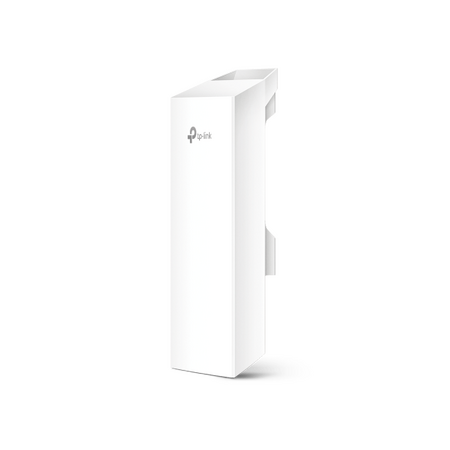
A property outside Penrith had a detached workshop about 80 metres from the main house — far enough that the indoor Wi-Fi signal gave up somewhere around the back fence. The owner wanted two CCTV cameras running in the workshop and a laptop online for invoicing, but the NBN connection for the address wasn't due for another six weeks. Trenching conduit underground for a job that size wasn't in the budget, so the fix was a point-to-point outdoor wireless bridge instead.
Standard indoor routers are built to cover a house, not bridge two separate structures — pushing Wi-Fi that far usually means dropped frames and an unreliable CCTV feed, if it connects at all. Trenching a cable run between buildings solves the range problem, but it means council approval in some council areas, disruption to a yard or driveway, and a job timeline measured in days rather than hours. A pair of outdoor CPE units mounted with a clear line of sight does the same job in an afternoon, without touching the ground between the two buildings.
With the NBN connection still weeks away, the house was already running off the 4G router already in place, so the bridge's job wasn't to create a new internet connection — it was to carry the one already working in the house out to the second building. One CPE unit mounts near where that connection enters the house, the other mounts on the workshop, and the link between them behaves like an Ethernet cable stretched through the air. Once that's confirmed stable, whatever runs off the house connection — laptop, CCTV, a second Wi-Fi access point — can run off it at the workshop end too.
The bridge gets data to the workshop, but the two CCTV cameras mounted there still need power, and running a separate power cable alongside a wireless link defeats half the point of not trenching. That's where a PoE router built for CCTV earns its place at that end — it takes the single Ethernet run off the bridge's outdoor CPE unit and pushes both data and power down to each camera off the one cable, so the only physical wiring inside the workshop is from the router to the cameras themselves.
Both units create the same kind of link — the difference is frequency, and that decides how forgiving the link is about what's standing between the two buildings.
| Model | Frequency | Antenna Gain | Wireless Rate | Best Suited To |
|---|---|---|---|---|
| CPE220 | 2.4GHz | 12dBi | Up to 300Mbps | Links with a tree line, fence, or partial obstruction — 2.4GHz generally holds up better through minor obstructions |
| CPE510 | 5GHz | 13dBi | Up to 300Mbps | Clean, unobstructed line of sight where more headroom is useful for CCTV plus general data use |
Actual throughput and effective range depend on line of sight, obstructions and interference on site — treat the figures above as a starting point for planning the job, not a guaranteed result. A quick site check with both units before final mounting is worth the extra half hour.
How far apart can the two buildings be for a point-to-point wireless bridge to work reliably?
It depends more on line of sight and obstructions than raw distance — a clean, unobstructed link can run well beyond what most residential and small-site jobs need, but tree growth, fences and terrain between the two points will cut into that range faster than distance alone.
Do I need a completely clear line of sight between the two units?
As close to clear as possible. Both units should be mounted high enough to see over fences, sheds and low vegetation — even partial obstruction in the direct path will reduce signal strength and reliability.
Which unit handles trees or a fence line between the buildings better?
The TP-Link CPE220 is the better starting point — 2.4GHz generally tolerates minor obstruction better than 5GHz, which needs a cleaner path to perform well.
Do I need an ACMA licence to run a point-to-point wireless bridge in Australia?
Equipment in the 2.4GHz and 5GHz bands generally operates under ACMA class licence conditions rather than an individual licence, but conditions differ by exact frequency and power output, and some 5GHz sub-bands carry outdoor-use restrictions. Check the current class licence conditions for the specific band the unit operates in before installing, rather than assuming it's automatically clear.
What data rate can I expect over the bridge for CCTV plus general use?
For a couple of CCTV streams plus everyday browsing and invoicing traffic, the TP-Link CPE510 generally has more comfortable headroom, provided the line of sight is clean — 5GHz tends to carry less interference in built-up areas than 2.4GHz.
Related Reading
Both units below are in stock at trade pricing, with same-day dispatch from Kingsgrove NSW on in-stock orders.
Find the right point to point outdoor wireless bridge for your installation at Schnap.

SCHNAP Electrical Wholesaler - clear, upfront pricing that professional electricians trust

Get what you need in seconds. SCHNAP electrical wholesaler makes ordering quick and simple

Fast delivery anywhere - that's guaranteed. SCHNAP electrical wholesalers ship nationwide with same-day dispatch

Track your order every step of the way. SCHNAP electrical wholesale keeps you updated from click to delivery

SCHNAP is Australia's premier electrical wholesaler and electrical supplies, marketing thousands of quality products from leading brands. Trusted for nearly two decades by licensed electricians, contractors, and engineers, our range covers everything from basic electrical components to complex industrial electrical equipment
Our key categories include: LED lighting, designer switches, commercial switchboards, circuit protection, security systems & CCTV, and smart home automation
All products are certified to Australian standards (AS/NZS), backed by our 30-day, no-questions-asked return policy. Our expert technical team helps you quickly source the right solution for any residential, commercial, or industrial project, with daily dispatch from our Sydney electrical warehouse delivering Australia-wide
SCHNAP offers the most comprehensive electrical product range, with full technical specifications, application details, installation requirements, compliance standards, and warranties — giving professionals total confidence in every purchase


Kingsgrove Branch:
Opening hours:
Mon - Fri: 6:30 AM to 5 PM
Saturday: 8:00 AM to 2:00 PM
Sunday: 9:00 AM to 2:00 PM
Closed on public holidays
Jannali Branch:
Closed for Renovations
© 2004 - 2026 SCHNAP Electric Products