

Kingsgrove Branch:



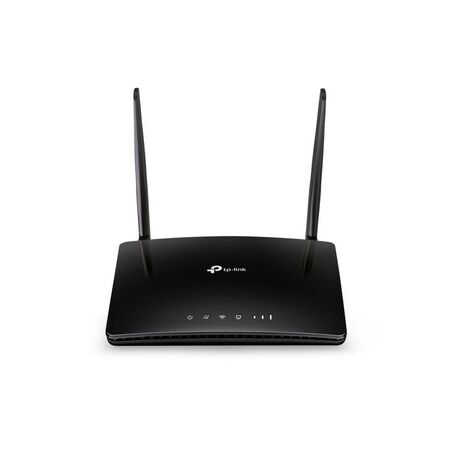
The demountable's been craned in, the temporary board is live, and the builder wants drawings, timesheets and the site cameras online by Monday — but the NBN connection for the lot is still weeks away. A 4G router with a data SIM is usually the quickest way to get the site office working in the meantime, and if you pick it well, it can stay on as the backup once the fixed line finally lands. Here's what to check on signal, sizing and failover before you order one.
On a new build, the fixed connection is rarely the first service ready. The lead-in has to be in the ground, the pit and pathway have to meet the network's requirements, and only then does a connection get booked. Any hold-up along that chain pushes the date back. If you're the one running the pathway, it's worth getting the NBN lead-in conduit and fittings right the first time, because redoing a lead-in only adds to the wait.
Meanwhile, the people on site still need internet. Supervisors are pulling revised drawings, subbies are clocking on through an app, and the client often wants cameras recording from the day the fence goes up. Tethering off a phone works for an afternoon, not for three months. A dedicated 4G router takes a data SIM, turns the mobile signal into a normal Wi-Fi and Ethernet network, and sits in the site office like any other piece of network gear.
The router is only as good as the signal where it sits. Check coverage inside the demountable itself, not out in the car park — a steel-clad site office can take a noticeable bite out of reception compared with standing outside. Walk around inside with a phone on the same carrier you plan to put in the router and note where the signal holds up best. That spot, often near a window facing the nearest tower, is where the router wants to live.
Choose the carrier based on what you measure on site, not on what the office uses back at base. On fringe sites, a router with detachable antennas gives you options later, such as fitting higher-gain or externally mounted antennas. A unit with internal antennas leaves you moving the whole router around instead. Check the antenna connector type and the carrier's recommendations before buying any add-ons.
Count what needs a cable and what needs Wi-Fi. A laptop and a tablet in a lock-up shed is a very different load from a site office with a printer, two desktops, a screen for drawings and an NVR. The compact TP-Link TL-MR100 covers the small end with one LAN port and 2.4 GHz Wi-Fi. Past that, you want more wired ports, dual-band Wi-Fi, or both.
| Model | Wired Ports | Wi-Fi | Worth Knowing |
|---|---|---|---|
| TP-Link TL-MR100 | 1 LAN, 1 WAN | 2.4 GHz, up to 300 Mbps | Smallest unit — one or two users |
| TP-Link TL-MR6400 | 3 LAN, 1 WAN | 2.4 GHz, up to 300 Mbps | Internal antennas — small site office |
| TP-Link Archer MR402 | 4 x 10/100 LAN | Dual-band AC1200 | External antennas — more Wi-Fi users |
| Legrand 659192 | Check datasheet | 802.11b/g/n | 4G LTE up to 150 Mbps, built-in firewall |
| TP-Link Omada ER706WP-4G | 5 x Gigabit LAN/WAN | Wi-Fi 6 AX3000 | Cat6 LTE up to 300 Mbps, VPN, cloud managed |
Two things in that table are easy to miss. The Archer MR402's four LAN ports are 10/100, which is fine for printers and internet traffic but slow for moving big files between machines on site. And the Wi-Fi figures are the router's local wireless rate, not what the 4G connection will actually deliver — that depends on signal, carrier and how busy the tower is.
If the security install is going in at the same time, plan the network around the cameras rather than bolting them on later. A 4G router gives the site its internet, but it isn't there to power cameras. On most jobs it feeds a PoE router or switch that handles that part, and choosing a PoE router for CCTV comes down to power budget and port count, not just how many cameras are on the drawing. And where the cameras or a second office sit in a separate building across the yard, a point-to-point outdoor wireless bridge can carry the connection over without trenching a cable run.
Once the fixed line is connected, the 4G router doesn't have to go back in the box. For a business client, a backup 4G router is cheap insurance: the NBN connection becomes the main link, and the 4G side takes over if that link drops. Whether a given model can switch over automatically depends on its firmware and operating modes, so check the failover settings on the unit before you promise it to a client.
For a site that's staying on as a small office or showroom, the Omada 4G+ Gigabit VPN router is built with that job in mind. Its listing shows Cat6 LTE up to 300 Mbps, five Gigabit LAN/WAN ports, Wi-Fi 6, VPN support and cloud management through the Omada app, with 4G+ LTE backup named as one of its applications. The product name also references PoE+, so check the datasheet for how many ports carry power and what the budget is before counting on it for cameras.
Worth flagging to the client: 4G failover only helps while the router still has power. If the NBN equipment and the router lose mains in a blackout, the backup goes down with them unless both are on a UPS.
Do I need a registered cabler to install a 4G router?
Plugging in the router and connecting devices with patch leads generally isn't regulated cabling work. Running fixed data cabling through walls or between buildings is customer cabling under ACMA's rules, so that part needs a cabler registered for the type of work involved.
Is it legal to use a mobile signal booster on a job site in Australia?
Only with the carrier's authorisation — unapproved mobile repeaters can interfere with the network and aren't permitted. If poor signal is the problem, better antennas on the router are usually the simpler fix. Ask the carrier about approved options before buying anything.
Does a 4G router in a site office need to be tested and tagged?
On construction sites, plug-in equipment, including the router's power supply, generally falls under the site's inspection and testing regime, which in most cases follows AS/NZS 3012. Check what your state regulator and the principal contractor require.
Why can't I view my CCTV remotely over a 4G connection?
Most likely the mobile plan uses carrier-grade NAT, which blocks incoming connections even when port forwarding is set up correctly. The NVR's own cloud or P2P app usually works around it, or ask the carrier about a public IP option.
Will a 4G router work inside a shipping container site office?
Often, but expect weaker signal than outside. A unit with internal antennas like the TP-Link TL-MR6400 needs to sit near a window or door. If signal is marginal even there, look at a model with detachable antennas.
How many devices can a 4G router handle in a site office?
It depends more on Wi-Fi bands and port count than on a headline number. For a few wired devices plus several people on Wi-Fi, a dual-band unit like the Archer MR402 with four LAN ports is a sensible step up from a single-port model.
Is a 4G router secure enough for a business network?
It can be, if it's set up properly — change the default admin password, keep the firmware updated and put visitors on a separate guest network. For a client who wants more control, the Legrand 4G LTE router is listed with a built-in firewall, and the Omada unit supports several VPN protocols.
Related Reading
Trade discounts apply on every model below, with same-day dispatch from Kingsgrove NSW on orders placed before cut-off.
Compact 4G Routers for Site Offices
Business-Grade 4G Routers for Backup
Need the right 4G router for the job? Browse the range at Schnap.

SCHNAP Electrical Wholesaler - clear, upfront pricing that professional electricians trust

Get what you need in seconds. SCHNAP electrical wholesaler makes ordering quick and simple

Fast delivery anywhere - that's guaranteed. SCHNAP electrical wholesalers ship nationwide with same-day dispatch

Track your order every step of the way. SCHNAP electrical wholesale keeps you updated from click to delivery

SCHNAP is Australia's premier electrical wholesaler and electrical supplies, marketing thousands of quality products from leading brands. Trusted for nearly two decades by licensed electricians, contractors, and engineers, our range covers everything from basic electrical components to complex industrial electrical equipment
Our key categories include: LED lighting, designer switches, commercial switchboards, circuit protection, security systems & CCTV, and smart home automation
All products are certified to Australian standards (AS/NZS), backed by our 30-day, no-questions-asked return policy. Our expert technical team helps you quickly source the right solution for any residential, commercial, or industrial project, with daily dispatch from our Sydney electrical warehouse delivering Australia-wide
SCHNAP offers the most comprehensive electrical product range, with full technical specifications, application details, installation requirements, compliance standards, and warranties — giving professionals total confidence in every purchase


Kingsgrove Branch:
Opening hours:
Mon - Fri: 6:30 AM to 5 PM
Saturday: 8:00 AM to 2:00 PM
Sunday: 9:00 AM to 2:00 PM
Closed on public holidays
Jannali Branch:
Closed for Renovations
© 2004 - 2026 SCHNAP Electric Products