

Kingsgrove Branch:



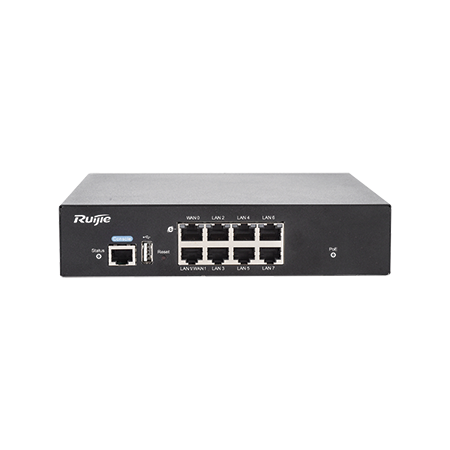
| Model | Ports | PoE Ports | WAN Ports |
|---|---|---|---|
| 5-Port Managed PoE Router (MG01) | 5 | 4x Gigabit | 2 |
| 10-Port Managed PoE Router (MG02) | 10 | 8x Gigabit | 4 |
| PoE Security Gateway Router (SG01) | 7 | Gigabit — check listed PoE budget for your camera load | 1Gbps |
For a straightforward four-to-six camera retail or small office job, the 5-port unit is usually enough, and the security gateway router is worth considering when the client wants a system that's built with security-specific features in mind rather than a general-purpose router pressed into service. Bigger jobs — multi-tenant buildings, warehouses with a dozen cameras plus access control — are where the 10-port unit earns its keep, since running out of PoE ports halfway through a job means either a second box or an awkward conversation with the client about scope.
Not every site has a fixed internet connection ready to go when the cameras need to start uploading footage — a new build or a demountable on a construction site is often still waiting on its NBN connection weeks after the cameras are already up. On those jobs, a 4G router covering the gap until the fixed line lands keeps the client's system live from day one instead of sitting dark until the connection's sorted. And on properties where the cameras aren't all on one building — a shed or a detached garage separate from the main structure — running a wireless bridge across to the far building means you're not trenching cable just to get one more camera online.
Check the CCTV power supply sizing once the router and camera count are settled — the PoE budget on the router covers the cameras themselves, but if there's a separate NVR or additional non-PoE gear on the same circuit, that's a different sizing question entirely.
Do I need an ACMA-registered cabler to install PoE cameras and a PoE router?
Generally yes — structured data cabling for CCTV systems typically falls under ACMA's cabling licensing rules, so confirm your registration covers the class of cabling work involved before quoting the job.
Does a PoE router need to be on a dedicated circuit?
Not usually — most run fine off a general power circuit like any other network device, but check the manufacturer's specs if it's sharing a circuit with other higher-draw equipment.
How many PoE ports do I need for a typical small business CCTV job?
Enough for the current camera count plus 2-3 spare, since additions are common. For anything past six to eight cameras, look at a 10-port unit so you're not squeezed out on the next visit.
Will a PoE router work with a vehicle DVR setup?
Not directly — vehicle DVR systems run off the vehicle's own power supply rather than a fixed PoE router, so they're a different setup entirely.
Do I still need an alarm panel if I'm already running CCTV on a PoE router?
Yes — CCTV and intrusion alarm are separate systems. If the job includes both, sizing the alarm zones is a separate step from sizing the PoE router.
Can I mix PoE cameras and non-PoE devices on the same router?
Yes — non-PoE devices just plug into the regular Ethernet ports and won't draw from the PoE power budget.
Related Reading
Trade discounts apply and orders placed before cut-off ship same-day from Kingsgrove NSW.
Browse the full router range at Schnap.

SCHNAP Electrical Wholesaler - clear, upfront pricing that professional electricians trust

Get what you need in seconds. SCHNAP electrical wholesaler makes ordering quick and simple

Fast delivery anywhere - that's guaranteed. SCHNAP electrical wholesalers ship nationwide with same-day dispatch

Track your order every step of the way. SCHNAP electrical wholesale keeps you updated from click to delivery

SCHNAP is Australia's premier electrical wholesaler and electrical supplies, marketing thousands of quality products from leading brands. Trusted for nearly two decades by licensed electricians, contractors, and engineers, our range covers everything from basic electrical components to complex industrial electrical equipment
Our key categories include: LED lighting, designer switches, commercial switchboards, circuit protection, security systems & CCTV, and smart home automation
All products are certified to Australian standards (AS/NZS), backed by our 30-day, no-questions-asked return policy. Our expert technical team helps you quickly source the right solution for any residential, commercial, or industrial project, with daily dispatch from our Sydney electrical warehouse delivering Australia-wide
SCHNAP offers the most comprehensive electrical product range, with full technical specifications, application details, installation requirements, compliance standards, and warranties — giving professionals total confidence in every purchase


Kingsgrove Branch:
Opening hours:
Mon - Fri: 6:30 AM to 5 PM
Saturday: 8:00 AM to 2:00 PM
Sunday: 9:00 AM to 2:00 PM
Closed on public holidays
Jannali Branch:
Closed for Renovations
© 2004 - 2026 SCHNAP Electric Products