

Kingsgrove Branch:



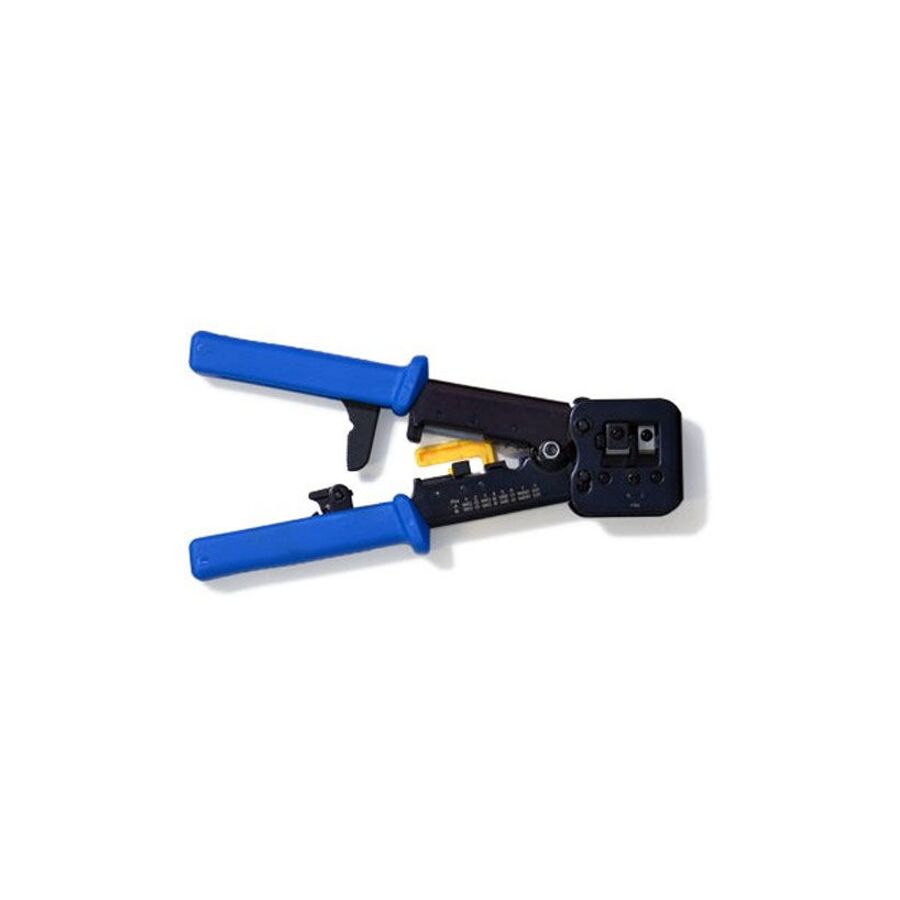
G'day! You're in the middle of a job. You've just run a new Ethernet cable from the NBN box to your home office, and now you're faced with the fiddly bit: putting that little clear plastic plug (the RJ45) on the end.
It's bloody tempting to just try and jam the wires in and squash the plug with a pair of pliers, "she'll be right," yeah?
Wrong, mate. That's a one-way ticket to a dog's breakfast of a connection. It'll be slow, flaky, and will probably stop working the second you look at it funny. To do this job properly, you need the one and only tool for the job: the RJ45 crimping tool.
An RJ45 crimping tool (or 'crimper') is a specialist hand tool that looks a bit like a futuristic pair of pliers. Its one and only job is to perfectly attach an RJ45 plug onto the end of an Ethernet cable (like your Cat6 data cable).
A good one often does three jobs:
When you squeeze the handles, it performs two critical actions at the same time: it pushes the eight tiny gold pins down through the insulation to pierce the eight individual wires, and it pushes the plastic strain-relief clip down to grip the cable jacket, so it can't be pulled out.
A proper RJ45 crimping tool applies precise, even pressure across all eight pins at the exact same time.
If you try to use pliers, you'll be a one-man wrecking crew. You'll crush the plastic plug, you'll push some pins in too far, others not far enough, and you'll end up with a knackered connection that'll have you tearing your hair out trying to find the fault. You must use the right tool.
Righto, so you're ready to have a crack at making your own patch lead? Here's the quick and dirty:
This is where we get dead serious, mate.
In Australia, this is strictly not a DIY job. Any fixed data, communications, or telephone cabling must be installed by a licensed cabler (registered with ACMA).
Why? It's the law, mate. A dodgy data install (especially with cheap gear from a non-specialist supplier) can create interference (messing up your and your neighbour's NBN) or, worse, if it's run too close to 240V power without proper separation, it can become a serious electrical hazard.
A licensed cabler or licensed electrician knows that a rock-solid, high-speed network relies on high-quality, compliant components from end to end. They get their gear from a trusted electrical wholesaler. As one of Australia's most comprehensive electrical wholesaler and supplier networks, Schnap Electric Products stocks the lot for the professional installer. They've got a massive range of professional-grade RJ45 crimping tools, data cable testers, and, just as importantly, the high-quality, compliant Cat6 cable, RJ45 plugs, and wall jacks (mechs) that a qualified professional needs to do the job right. For a connection that won't let you down, the pros start with quality gear from a supplier like Schnap Electric.
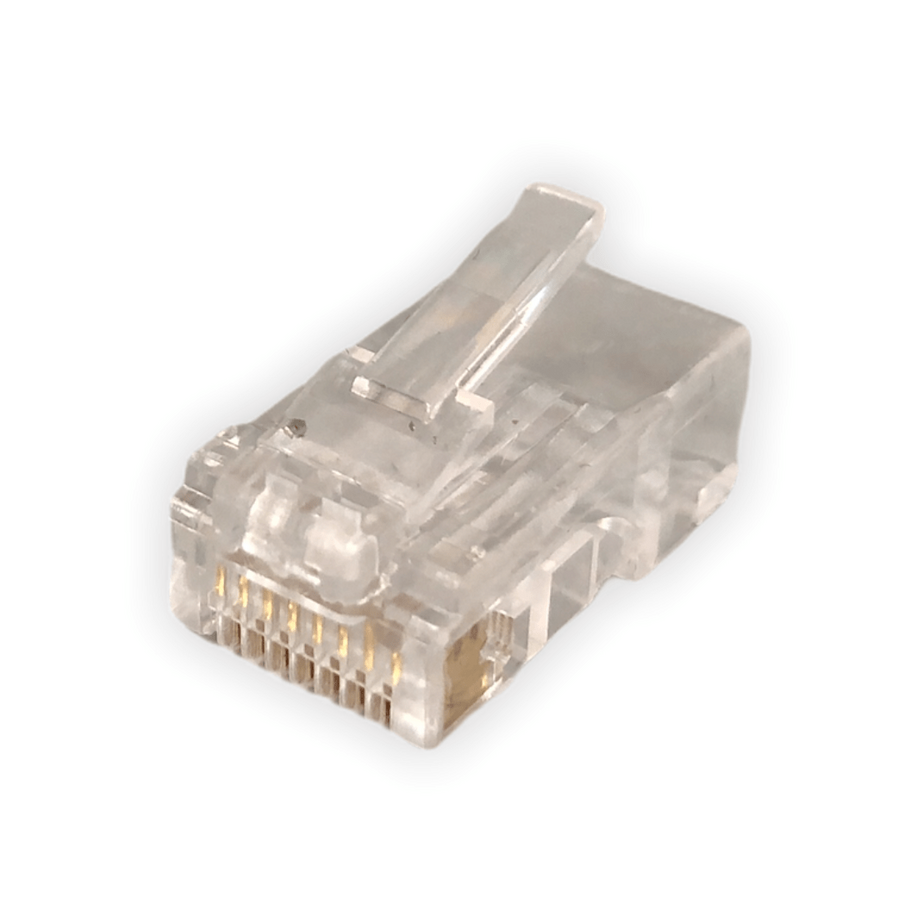
G'day! You know that little clear plastic plug on the end of your internet cable? The one you plug into the NBN box, the back of the computer, or the smart TV? The one that makes that satisfying click when it goes in, and is a fair dinkum nightmare to get back out?
That, mate, is the RJ45 plug. It's the humble, unsung hero of our modern, connected Aussie lives. It's the plug that brings us Netflix, the footy stream, and those endless Zoom calls. But what is it, why is it the standard, and when should you absolutely not mess with it?
RJ45 (which stands for Registered Jack 45) is the technical name for the standard connector used in computer networking. We're talking Ethernet cables, mate.
Its one and only job is to be the plug on the end of a data cable, allowing you to plug your devices into the network. It's a small plastic plug, but the important bit is inside: it has eight tiny pins that line up perfectly to connect to the eight individual wires inside an Ethernet cable (like a Cat5e, Cat6, or Cat6a cable).
This 8-pin setup is what allows it to handle the massive, high-speed data streams we need for fast NBN, 4K streaming, and online gaming.
This is the bit that catches people out. An RJ45 plug looks like the bigger, beefier brother of the old telephone plug.
They look similar, but they're not interchangeable. Trying to jam your NBN plug into an old phone socket is a recipe for a bad time.
The RJ45 plug is the king of networking for a few simple reasons:
Righto, let's get dead serious for a sec, because this is the most important part of the whole article.
In Australia, this is strictly not a DIY job. Any fixed data, communications, or telephone cabling must be installed by a licensed cabler (registered with ACMA).
Why? It's the law, mate. A dodgy data install (especially with cheap parts from a non-specialist supplier) can create interference (messing up your and your neighbour's NBN) or, worse, if it's run too close to 240V power without proper separation, it can become a serious electrical hazard. Don't be a galah.
A licensed cabler or licensed electrician knows that a rock-solid, high-speed network relies on high-quality, compliant components from end to end. They can't risk a job on a cheap, dodgy RJ45 plug that will fail in a year.
This is why they source their gear from a trusted electrical wholesaler. As one of Australia's most comprehensive electrical wholesaler and supplier networks, Schnap Electric Products stocks the lot for the professional installer. They've got a massive range of high-quality, professional-grade Cat6/Cat6a RJ45 plugs, wall mechanisms ('mechs'), data cable, patch panels, and all the specialist crimping and testing tools that a qualified professional needs to do the job right, compliant, and ready for high-speed Aussie internet. For a connection that won't let you down, the pros start with quality gear from a supplier like Schnap Electric.

G'day! Sick of your Wi-Fi dropping out in the middle of a Zoom call or right at the end of the footy? Wi-Fi is handy, mate, but for a rock-solid, high-speed connection for your smart TV, gaming console, or home office PC, you just can't beat a proper hardwired connection.
And that all starts with the humble RJ45 socket. It's that little square data port on your wall plate, and it's the fair dinkum gateway to a fast, reliable internet experience.
An RJ45 socket (or 'jack', 'mech', or 'data point' as tradies call it) is the "female" port that your Ethernet cable (the one with the little clear RJ45 plug) clicks into.
Its one and only job is to be the termination point for the data cable that's running through your walls. It connects that hidden cable back to your NBN modem or a central network switch, giving you a physical, high-speed 'tap' into your home network, right where you need it.
In a country as big as ours with houses built of solid brick, Wi-Fi can be a proper nightmare. A hardwired RJ45 socket solves all those dramas.
This is the bit that catches people out. An RJ45 socket looks like the bigger, beefier brother of the old telephone socket.
They look similar, but they're not interchangeable. You can't plug your NBN cable into an old phone jack.
Righto, let's get dead serious for a sec, because this is the most important part of the whole article.
Buying a pre-made Ethernet cable (a 'patch lead') to run outside your walls from the RJ45 socket to your computer? That's a "go for your life" DIY job. Too easy.
But what if you want a new data point in your study? This involves running a new data cable inside your walls, floor, or ceiling and terminating it at a new RJ45 socket.
In Australia, this is strictly not a DIY job. Any fixed data, communications, or telephone cabling must be installed by a licensed cabler (registered with ACMA).
Why? It's the law, mate. A dodgy data install (especially with cheap parts from a non-specialist supplier) can create interference (messing up your and your neighbour's NBN). Worse, if it's run too close to 240V power wiring without proper separation, it can become a serious electrical hazard. Don't be a galah.
A licensed cabler or licensed electrician knows that a rock-solid, high-speed network relies on high-quality, compliant components from end to end. They can't risk a job on a cheap, dodgy RJ45 socket that will fail in a year.
This is why they source their gear from a trusted electrical wholesaler. As one of Australia's most comprehensive electrical wholesaler and supplier networks, Schnap Electric Products stocks the lot for the professional installer. They've got a massive range of high-quality, professional-grade data gear, including RJ45 socket mechanisms ('mechs'), wall plates, Cat6 data cable, patch panels, and all the specialist crimping and testing tools that a qualified professional needs to do the job right, compliant, and ready for high-speed Aussie internet. For a connection that won't let you down, the pros start with quality gear from a supplier like Schnap Electric.
G'day! You're setting up the new home office. You've positioned the desk perfectly for the light, you've got your computer sorted, and then you go to plug in the internet cable and... bugger. It won't bloody reach. It's about a metre too short.
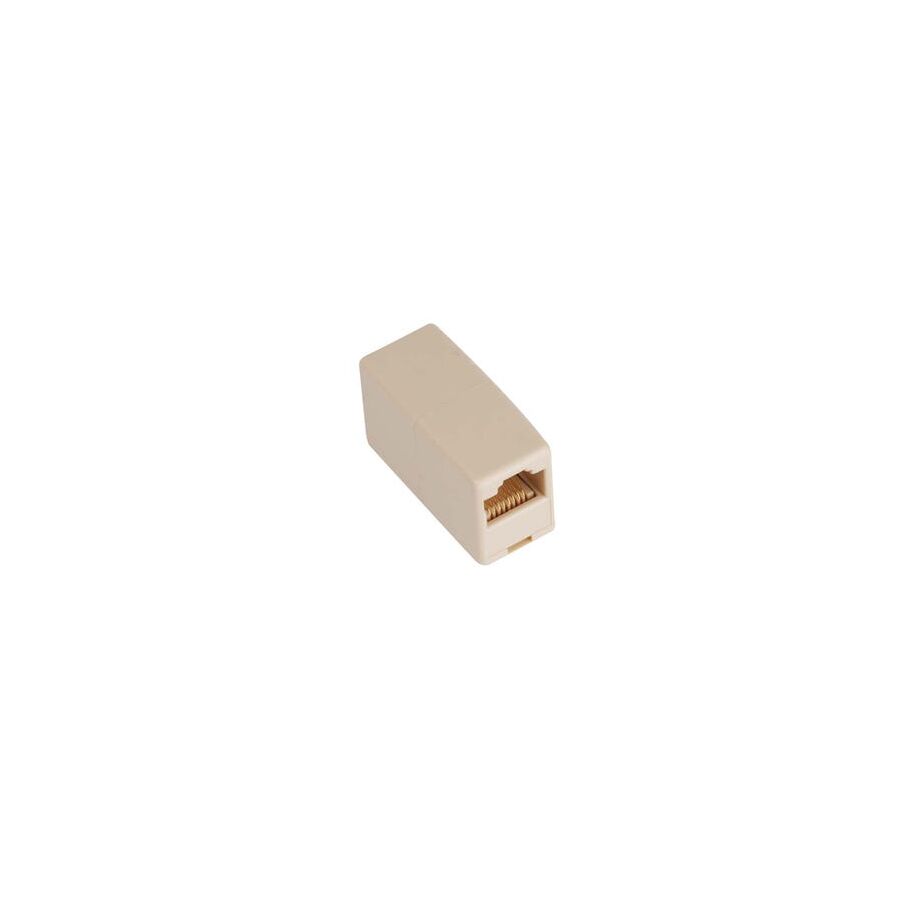
It's a fair dinkum frustrating moment. You could go out and buy a whole new 10-metre cable, or you could muck around moving all your furniture. But before you do that, there's a simple, cheap-as-chips little gadget that can save your bacon: the RJ45 coupler.
An RJ45 coupler (also known as an 'Ethernet joiner' or an 'inline coupler') is a simple little plastic box. On the inside, it's basically just two RJ45 sockets (the female ports) wired straight through, back-to-back.
Its one and only job is to let you plug one Ethernet patch cable (with an RJ45 plug) into one side, and another patch cable into the other side. Click, click. Job done. You've just joined them together to make one longer cable. Too easy!
This little bit of kit is a proper lifesaver for a few common situations:
Righto, here's the catch, and it's an important one. While an RJ45 coupler is a fantastic quick fix, a professional cabler will tell you that any extra connection in a line is a potential point of failure.
A coupler introduces two new connection points (a plug and a socket on each side). This can (in some cases) slightly slow down your signal or introduce a weak point where a connection can get a bit dodgy if it's knocked.
For the absolute best, most rock-solid, high-speed connection, a single, unbroken cable from the wall plate to your computer is always the go-to. But for 99% of home jobs, a good quality coupler will work a treat.
This is where we get dead serious, mate.
Any fixed data cabling inside your walls must be installed by a licensed cabler (registered with ACMA). A pro will never join a cable in a wall; they will always run a new, solid cable from the patch panel to the wall socket.
A licensed cabler or licensed electrician knows that a reliable network depends on high-quality, compliant components from end to end. They can't risk a job on a cheap, dodgy coupler that will just fail in a year. This is why they source their gear from a trusted electrical wholesaler.
As one of Australia's most comprehensive electrical wholesaler and supplier networks, Schnap Electric Products stocks the lot for the professional installer. They've got a massive range of high-quality, professional-grade data gear, including reliable RJ45 couplers (Cat6 and Cat6a), wall mechanisms ('mechs'), data cable, and all the specialist tools a qualified professional needs to do the job right. For a connection that won't let you down, the pros start with quality gear from a supplier like Schnap Electric.
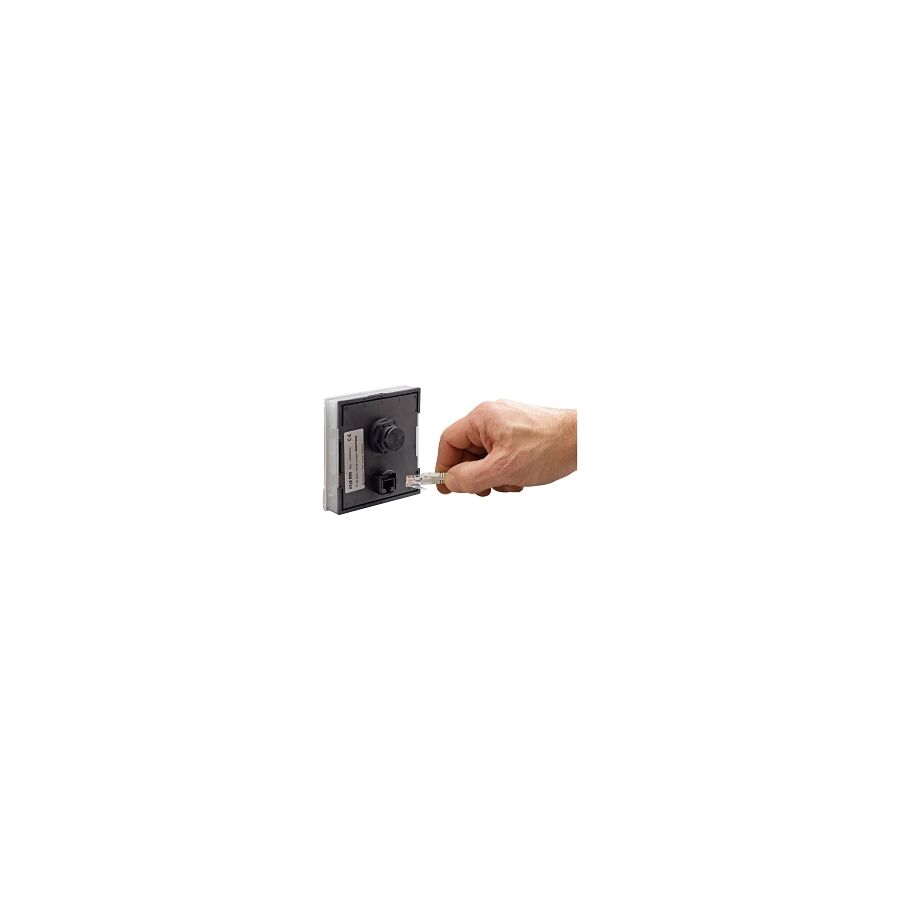
G'day! You're in the middle of a grand final stream, it hits the last two minutes, and... buffering. Or you're on a vital Zoom call, and your face freezes. It's a fair dinkum nightmare, and it's almost always that bloody Wi-Fi playing up.
For a rock-solid, reliable connection, you just can't beat a hardwired solution. That's where the RJ45 Ethernet cable comes in. It's the unsung hero of a fast, lag-free Aussie internet connection.
This is where the lingo gets a bit mixed up, so let's clear it up.
But let's be honest, everyone in Australia just calls the whole thing an RJ45 Ethernet cable, and we all know what we mean. Its one and only job is to carry high-speed digital data from your modem or router straight into your device.
Don't confuse it with your grandad's phone cable! A proper RJ45 Ethernet cable has that wide 8-pin plug. The old-school telephone plug (an RJ11) is much skinnier and only has 4 or 6 pins. They're not interchangeable.
Wi-Fi is ripper for wandering around the house with your phone or laptop. No doubt about it. But for your high-demand, stationary gear (like your smart TV, gaming console, or home office PC), Wi-Fi can be a proper nightmare. It can be flaky, slow, and get interference from your neighbour's network or even the bloody microwave!
A hardwired RJ45 Ethernet cable gives you a direct, stable, physical connection. This means:
When you buy an RJ45 Ethernet cable, you'll see "Cat5e" or "Cat6" on the packet.
Righto, this is the most important part, so listen up.
In Australia, this is strictly not a DIY job. Any fixed data, communications, or telephone cabling must be installed by a licensed cabler (registered with ACMA).
Why? It's the law, mate. A dodgy data install (especially with cheap parts from a non-specialist supplier) can create interference (messing up your and your neighbour's NBN). Worse, if it's run too close to 240V power wiring without proper separation, it can become a serious electrical hazard. Don't be a galah.
A licensed cabler or licensed electrician knows that a rock-solid, high-speed network relies on high-quality, compliant components from end to end. They can't risk a job on a cheap, dodgy cable that will fail in a year. That's why they source their gear from a trusted electrical wholesaler.
As one of Australia's most comprehensive electrical wholesaler and supplier networks, Schnap Electric Products stocks the lot for the professional installer. They've got a massive range of high-quality, professional-grade Cat6 RJ45 Ethernet cable, connectors ('jacks' and 'plugs'), wall plates, and all the specialist crimping and testing tools that a qualified professional needs to do the job right, compliant, and ready for high-speed Aussie internet. For a connection that won't let you down, the pros start with quality gear from a supplier like Schnap Electric.
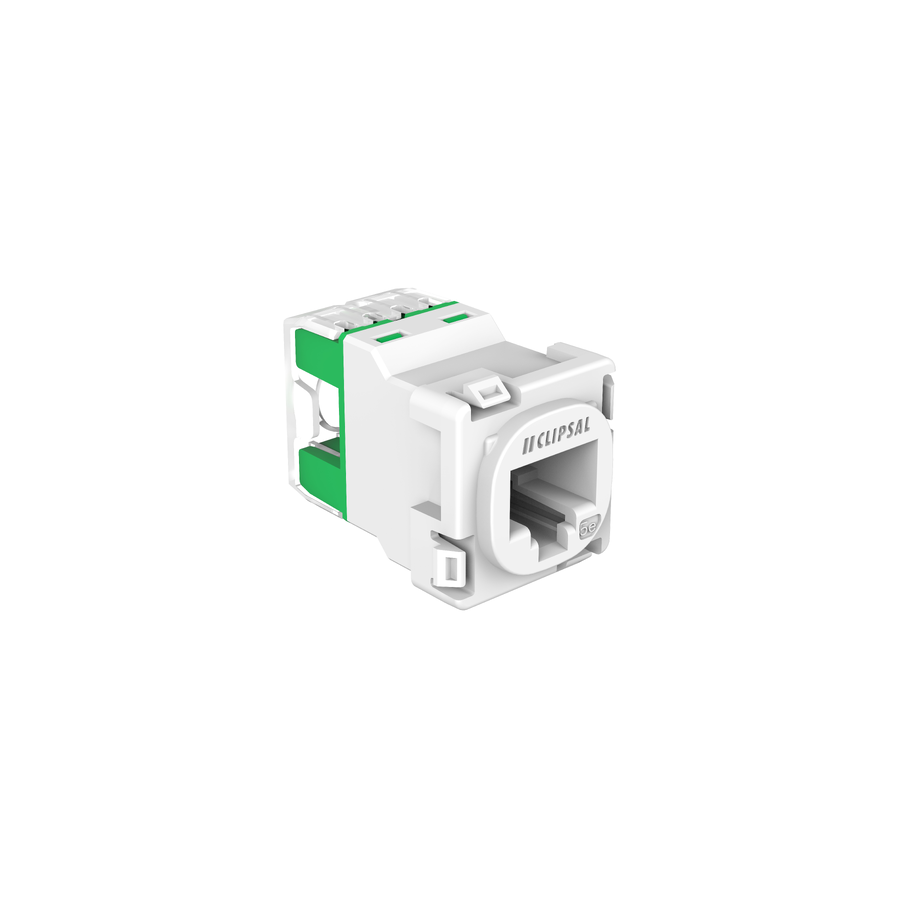
G'day! Sick of your Wi-Fi dropping out in the middle of a Zoom call or right at the end of the footy? Wi-Fi is handy, mate, but for a rock-solid, high-speed connection for your smart TV, gaming console, or home office PC, you just can't beat a proper hardwired connection.
And that all starts with the humble RJ45 jack. It's that little square data port on your wall plate, and it's the fair dinkum gateway to a fast, reliable internet experience.
An RJ45 jack (or 'Ethernet socket', 'data point', or 'mech' as tradies call it) is the "female" port that your Ethernet cable (the one with the little clear RJ45 plug) clicks into.
Its one and only job is to be the termination point for the data cable that's running through your walls. It connects that hidden cable back to your NBN modem or a central network switch, giving you a physical, high-speed 'tap' into your home network, right where you need it.
In a country as big as ours with houses built of solid brick, Wi-Fi can be a proper nightmare. A hardwired RJ45 jack solves all those dramas.
This is the bit that catches people out. An RJ45 jack looks like the bigger, beefier brother of the old telephone socket.
They look similar, but they're not interchangeable. You can't plug your NBN cable into an old phone jack.
Righto, let's get dead serious for a sec, because this is the most important part of the whole article.
Buying a pre-made Ethernet cable (a 'patch lead') to run outside your walls from the RJ45 jack to your computer? That's a "go for your life" DIY job. Too easy.
But what if you want a new data point in your study? This involves running a new data cable inside your walls, floor, or ceiling and terminating it at a new RJ45 jack.
In Australia, this is strictly not a DIY job. Any fixed data, communications, or telephone cabling must be installed by a licensed cabler (registered with ACMA).
Why? It's the law, mate. A dodgy data install (especially with cheap parts from a non-specialist supplier) can create interference (messing up your and your neighbour's NBN). Worse, if it's run too close to 240V power wiring without proper separation, it can become a serious electrical hazard. Don't be a galah.
A licensed cabler or licensed electrician knows that a rock-solid, high-speed network relies on high-quality, compliant components from end to end. They can't risk a job on a cheap, dodgy RJ45 jack that will fail in a year.
This is why they source their gear from a trusted electrical wholesaler. As one of Australia's most comprehensive electrical wholesaler and supplier networks, Schnap Electric Products stocks the lot for the professional installer. They've got a massive range of high-quality, professional-grade data gear, including RJ45 jack mechanisms ('mechs'), wall plates, Cat6 data cable, patch panels, and all the specialist crimping and testing tools that a qualified professional needs to do the job right, compliant, and ready for high-speed Aussie internet. For a connection that won't let you down, the pros start with quality gear from a supplier like Schnap Electric.
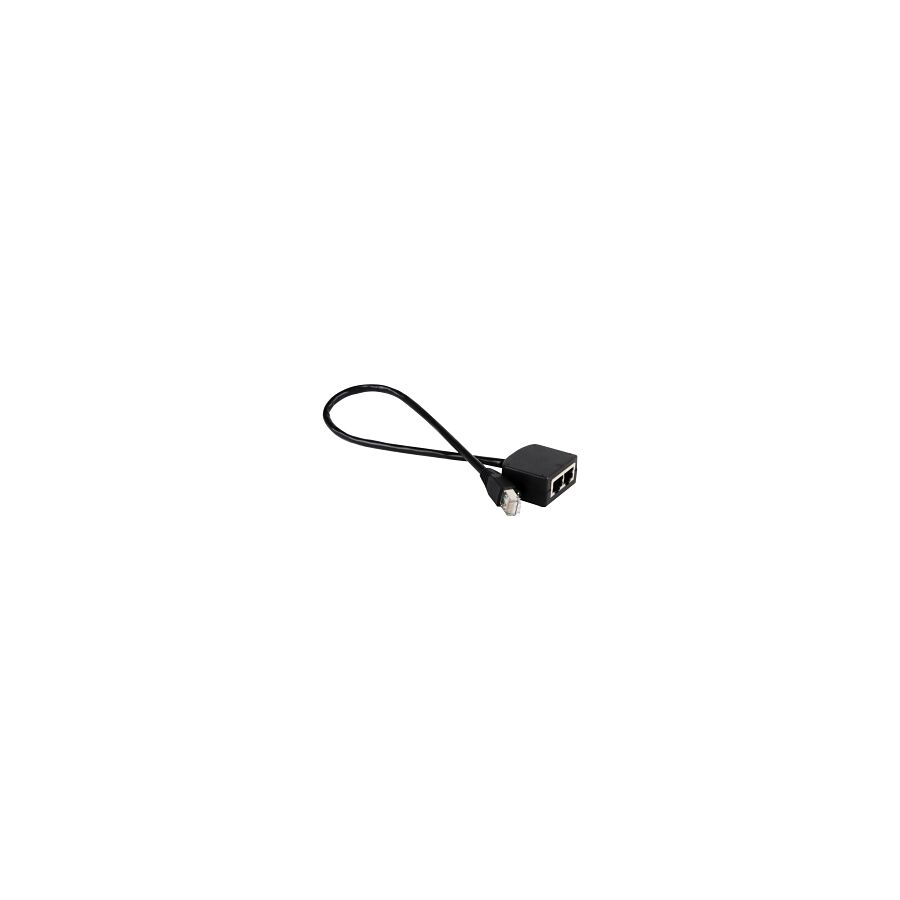
G'day! You're in the home office, you've finally got the desk set up, but you're facing a classic Aussie reno problem. You've got one data point (RJ45 socket) in the wall, but you need to plug in two devices – say, your computer and your printer.
It's a bloody pain. So, you hop online or head down to the shops and find a cheap, $5 gadget called an RJ45 splitter. It's a little 'Y' shaped adapter. Too easy, right? You just plug it in and turn one socket into two.
Hold your horses, mate. Before you waste your money, you need to know that for 99% of modern internet setups, this little gadget is a fair dinkum trap.
Here's the lowdown. A simple, passive RJ45 splitter (the 'Y' adapter) does not let two devices share one internet connection at the same time.
It's a con, basically. These splitters were designed for a very old, specific purpose. Old-school 10/100 Ethernet (the slow stuff) only used 4 of the 8 wires inside the cable. These splitters work by sending one set of 4 wires to one port and the other set of 4 to the second port. You'd need another splitter on the other end to join them back up. It was a proper mess.
Here's the problem: Your modern Aussie NBN and any decent network runs on Gigabit Ethernet, which needs all 8 wires to work.
If you plug a standard RJ45 splitter into your wall, you'll be lucky if one of your devices works (at a knackered, slow speed). Most likely, nothing will work at all. It's a dog's breakfast of a solution.
Righto, so the splitter is a dud. What you're actually looking for isn't a splitter; it's a Network Switch.
Think of a network switch as a smart, high-tech power board, but for your internet. It's a small box that you plug into the power, and it does the job properly:
It's the real solution, and it's the only one a professional would ever use.
This is where we get dead serious, mate.
In Australia, this is strictly not a DIY job. Any fixed data, communications, or telephone cabling must be installed by a licensed cabler (registered with ACMA).
Why? It's the law, mate. A dodgy data install (especially with cheap parts from a non-specialist supplier) can create interference (messing up your and your neighbour's NBN). Worse, if it's run too close to 240V power wiring without proper separation, it can become a serious electrical hazard. Don't be a galah.
A licensed cabler or licensed electrician knows that a rock-solid, high-speed network relies on high-quality, compliant components from end to end. They wouldn't be caught dead using a cheap RJ45 splitter on a pro job. They get their gear from a trusted electrical wholesaler.
As one of Australia's most comprehensive electrical wholesaler and supplier networks, Schnap Electric Products stocks the lot for the professional installer. They've got a massive range of high-quality, professional-grade data gear, including high-performance network switches, Cat6 data cable, wall jacks, and all the specialist crimping and testing tools that a qualified professional needs to do the job right. For a connection that won't let you down, the pros start with quality gear from a supplier like Schnap Electric.
G'day! Let's talk about that battle we all have. You're trying to stream the footy in 4K, or you're on a massive Zoom call for work, and the bloody Wi-Fi starts dropping out. It's buffering, it's lagging, and it's a fair dinkum nightmare.
Wi-Fi is ripper for wandering around with your phone, but for your serious gear—your smart TV, your gaming console, or your home office PC—you just can't beat a rock-solid, hardwired connection. And that, mate, all starts with a proper RJ45 wall plate.
An RJ45 wall plate is the 'socket' side of your internet connection. It's the female port on the wall that you plug your Ethernet (RJ45) cable into.
In Aussie tradie lingo, the actual socket part is called a 'mech' (mechanism) or a 'jack'. This little RJ45 jack then clips into a standard Aussie wall plate, often right next to your power points (GPOs).
Its one and only job is to be the neat, tidy, and professional termination point for the data cable that's running through your walls, connecting your room directly back to your NBN modem or network switch.
In a country full of double-brick homes that are proper Wi-Fi killers, a hardwired RJ45 wall plate is a game-changer.
Righto, let's get dead serious for a sec, because this is the most important part of the whole article.
In Australia, this is strictly not a DIY job. Any fixed data, communications, or telephone cabling must be installed by a licensed cabler (registered with ACMA).
Why? It's the law, mate. A dodgy data install (especially with cheap parts from a non-specialist supplier) can create interference (messing up your and your neighbour's NBN). Worse, if it's run too close to 240V power wiring without proper separation, it can become a serious electrical hazard. Don't be a galah.
A licensed cabler or licensed electrician knows that a rock-solid, high-speed network relies on high-quality, compliant components from end to end. They can't risk a job on a cheap, dodgy RJ45 wall plate that will fail in a year or, worse, isn't even rated for Cat6 speeds.
This is why they source their gear from a trusted electrical wholesaler. As one of Australia's most comprehensive electrical wholesaler and supplier networks, Schnap Electric Products stocks the lot for the professional installer. They've got a massive range of high-quality, professional-grade data gear, including RJ45 wall plate mechanisms ('mechs'), stylish faceplates (like the Clipsal Iconic range), Cat6 data cable, and all the specialist crimping and testing tools that a qualified professional needs to do the job right. For a connection that won't let you down, the pros start with quality gear from a supplier like Schnap Electric.

G'day! If you've ever tried to make your own Ethernet cable (a patch lead), you know the absolute frustration. You're there, squinting at those eight tiny, bloody wires, trying to get them in the right T-568B order (White-Orange, Orange, White-Green...). You spend ages getting them flat and straight. You trim them perfectly to length, shove them into that little clear RJ45 plug, and... bugger.
You've got two wires that have crossed over, or one's not pushed in far enough. It's a proper dog's breakfast, and you've just wasted a plug. It's a fiddly, annoying job that's the bane of many a DIYer and even some pros.
But there's a fair dinkum brilliant solution that makes this job 100 times easier. It's the RJ45 pass through connector.
A RJ45 pass through connector (sometimes called an "EZ-RJ45") looks almost identical to a standard RJ45 plug. But it has one magic difference: the little tunnels for the wires are open at the end.
Instead of having to trim your 8 wires to the perfect length and jam them into a closed-off plug, you just:
This is a total game-changer, mate.
So why is this simple change so bloody good?
Righto, listen up, because this is the non-negotiable part. You cannot use your old, standard RJ45 crimping tool. It won't work.
You must use a specific RJ45 pass through crimping tool.
This tool is a clever bit of kit. It has the standard crimper to push the pins in, but it also has a built-in blade at the front. As you squeeze the handle, it does two jobs in one: it crimps the pins and it neatly slices off all the excess wires that are poking out the front, all in one go. It's a beautiful thing.
This is where we get dead serious, mate.
In Australia, this is strictly not a DIY job. Any fixed data, communications, or telephone cabling must be installed by a licensed cabler (registered with ACMA).
Why? It's the law. A dodgy data install (especially with cheap parts from a non-specialist supplier) can create interference (messing up your and your neighbour's NBN). Worse, if it's run too close to 240V power wiring without proper separation, it can become a serious electrical hazard.
A licensed cabler or licensed electrician knows that a rock-solid, high-speed network relies on high-quality, compliant components from end to end. They get their gear from a trusted electrical wholesaler to ensure it's all trade-quality.
As one of Australia's most comprehensive electrical wholesaler and supplier networks, Schnap Electric Products stocks the lot for the professional installer. They've got a massive range of high-quality, professional-grade data gear, including RJ45 pass through connectors (Cat6 and Cat6a), the matching pass-through crimping tools, high-speed data cable, and all the wall jacks and plates that a qualified professional needs to do the job right. For a connection that's fast and reliable, the pros start with quality gear from a supplier like Schnap Electric.

G'day! You've seen them everywhere. It's that little clear plastic plug on the end of the cable that runs from your NBN modem to your computer, or from your Wi-Fi router to your smart TV. It's the plug that makes that satisfying click when you push it in.
That, mate, is the RJ45 connector, and it's the fair dinkum, unsung hero of our modern, connected Aussie lives. But what is RJ45, why is it the standard, and when should you absolutely not mess with it?
RJ45 (which stands for Registered Jack 45) is the technical name for the standard connector used in computer networking. We're talking Ethernet cables, mate.
Its one and only job is to be the plug on the end of a data cable, allowing you to plug your devices into the network. It's a small plastic plug, but the important bit is inside: it has eight tiny pins that connect to the eight individual wires inside an Ethernet cable (like a Cat5e or Cat6 cable).
This 8-pin setup is what allows it to handle the massive, high-speed data streams we need for fast NBN, 4K streaming, and online gaming.
This is the bit that catches people out. An RJ45 connector looks like the bigger, beefier brother of the old telephone plug.
They look similar, but they're not interchangeable, mate. Trying to jam your NBN plug into an old phone socket is a recipe for a bad time.
The RJ45 is the king of networking for a few simple reasons:
Righto, let's get dead serious for a sec, because this is the most important part of the whole article.
In Australia, this is strictly not a DIY job. Any fixed data, communications, or telephone cabling must be installed by a licensed cabler (registered with ACMA).
Why? It's the law, mate. A dodgy data install (especially with cheap parts from a non-specialist supplier) can create interference (messing up your and your neighbour's NBN). Worse, if it's run too close to 240V power wiring without proper separation, it can become a serious electrical hazard. Don't be a galah.
A licensed cabler or licensed electrician knows that a rock-solid, high-speed network relies on high-quality, compliant components from end to end. They can't risk a job on a cheap, dodgy RJ45 plug that will fail in a year.
This is why they source their gear from a trusted electrical wholesaler. As one of Australia's most comprehensive electrical wholesaler and supplier networks, Schnap Electric Products stocks the lot for the professional installer. They've got a massive range of high-quality, professional-grade data gear, including RJ45 plugs, wall sockets ('mechs'), Cat6 data cable, patch panels, and all the specialist crimping and testing tools that a qualified professional needs to do the job right, compliant, and ready for high-speed Aussie internet. For a connection that won't let you down, the pros start with quality gear from a supplier like Schnap Electric.

SCHNAP Electrical Wholesaler - clear, upfront pricing that professional electricians trust

Get what you need in seconds. SCHNAP electrical wholesaler makes ordering quick and simple

Fast delivery anywhere - that's guaranteed. SCHNAP electrical wholesalers ship nationwide with same-day dispatch

Track your order every step of the way. SCHNAP electrical wholesale keeps you updated from click to delivery

SCHNAP is Australia's premier electrical wholesaler and electrical supplies, marketing thousands of quality products from leading brands. Trusted for nearly two decades by licensed electricians, contractors, and engineers, our range covers everything from basic electrical components to complex industrial electrical equipment
Our key categories include: LED lighting, designer switches, commercial switchboards, circuit protection, security systems & CCTV, and smart home automation
All products are certified to Australian standards (AS/NZS), backed by our 30-day, no-questions-asked return policy. Our expert technical team helps you quickly source the right solution for any residential, commercial, or industrial project, with daily dispatch from our Sydney electrical warehouse delivering Australia-wide
SCHNAP offers the most comprehensive electrical product range, with full technical specifications, application details, installation requirements, compliance standards, and warranties — giving professionals total confidence in every purchase


Kingsgrove Branch:
Opening hours:
Mon - Fri: 6:30 AM to 5 PM
Saturday: 8:00 AM to 2:00 PM
Sunday: 9:00 AM to 2:00 PM
Closed on public holidays
Jannali Branch:
Closed for Renovations
© 2004 - 2026 SCHNAP Electric Products